
Live Galleries in Minutes: Website Hosting for Lightroom Photographers
Find website hosting that publishes from Lightroom, speeds client proofing, and keeps galleries live. Compare platforms and see why PhotoView fits...
Live Galleries in Minutes: Website Hosting for Lightroom Photographers
Photo website platforms vary in features like portfolio-first publishing, Lightroom integration, private client sharing, and live-embed galleries. If your needs run different directions, Squarespace covers general design polish, Wix suits photographers who want visual flexibility without much learning curve, WordPress fits power users who want total control, and SmugMug leans into print and digital sales. The right choice depends on whether you’re presenting work, selling it, or building something custom from scratch.
TL;DR:
- PhotoView offers native Lightroom publishing and private client delivery, making it ideal for photographers who prioritize quick, seamless portfolio updates.
- SmugMug and Pixieset excel in selling prints and digital downloads with built-in commerce and proofing features designed for client order workflows.
- WordPress paired with managed hosting provides maximum control and customization for experienced users willing to handle ongoing site maintenance.
- Budget options like Hostinger, Bluehost, or SiteGround are suitable for beginners comfortable managing their own setup and updates on WordPress.
- Platform choice depends heavily on whether a photographer focuses on portfolio presentation, sales, or custom site control, with each category requiring different core features.
PhotoViewKeep Your Portfolio MovingPhotoView helps Lightroom photographers publish galleries, present work responsively, and manage website updates from one organized dashboard.Explore PhotoView
Table of Contents
- What Is the Best Photo Website Hosting for Photographers?
- How Do the Top Photo Hosting Providers Actually Compare?
- How Should You Choose the Right Platform for Your Photography Business?
- How We Evaluated These Photo Hosting Platforms
- A Portfolio-First Take on Choosing Photo Website Hosting
- Try PhotoView for Your Next Portfolio Update
- Sources
- FAQ
What Is the Best Photo Website Hosting for Photographers?
The honest answer depends on what you’re optimizing for. Some photographers need a site that sells prints. Others need a site that gets a client to say yes after seeing 40 wedding images in the right order. Most comparisons lump every “photo hosting” option into one pile, but portfolio presentation, e-commerce, and general web hosting solve three different problems.
Here’s the shortlist that matters, broken into the categories photographers actually search for:
- Best overall for portfolio-first photographers: PhotoView, because Lightroom publishing and live embeds cut out the export-and-upload cycle entirely.
- Best for selling prints and digital downloads: SmugMug and Pixieset, both built around checkout flows and print fulfillment.
- Best for power users who want full control: WordPress, paired with managed hosting like SiteGround or Kinsta.
- Best budget entry point: Hostinger or Bluehost, if you’re comfortable handling setup yourself.
A distinction worth making early: image and video CDN platforms exist to solve delivery speed, not portfolio design. That matters because a fast-loading gallery on a slow, generic template still loses the client. Speed and presentation are separate problems, and the best photo website hosting options solve both.
The comparison table
The table below reflects how each platform handles the eight decisions that actually affect a working photographer’s week: onboarding difficulty, template flexibility, Lightroom support, proofing, sales tools, storage terms, and how much upkeep it demands.
| Platform | Best for | Ease of use | Gallery templates | Lightroom integration | Client proofing & delivery | E-commerce | Storage/pricing shape | Maintenance burden |
|---|---|---|---|---|---|---|---|---|
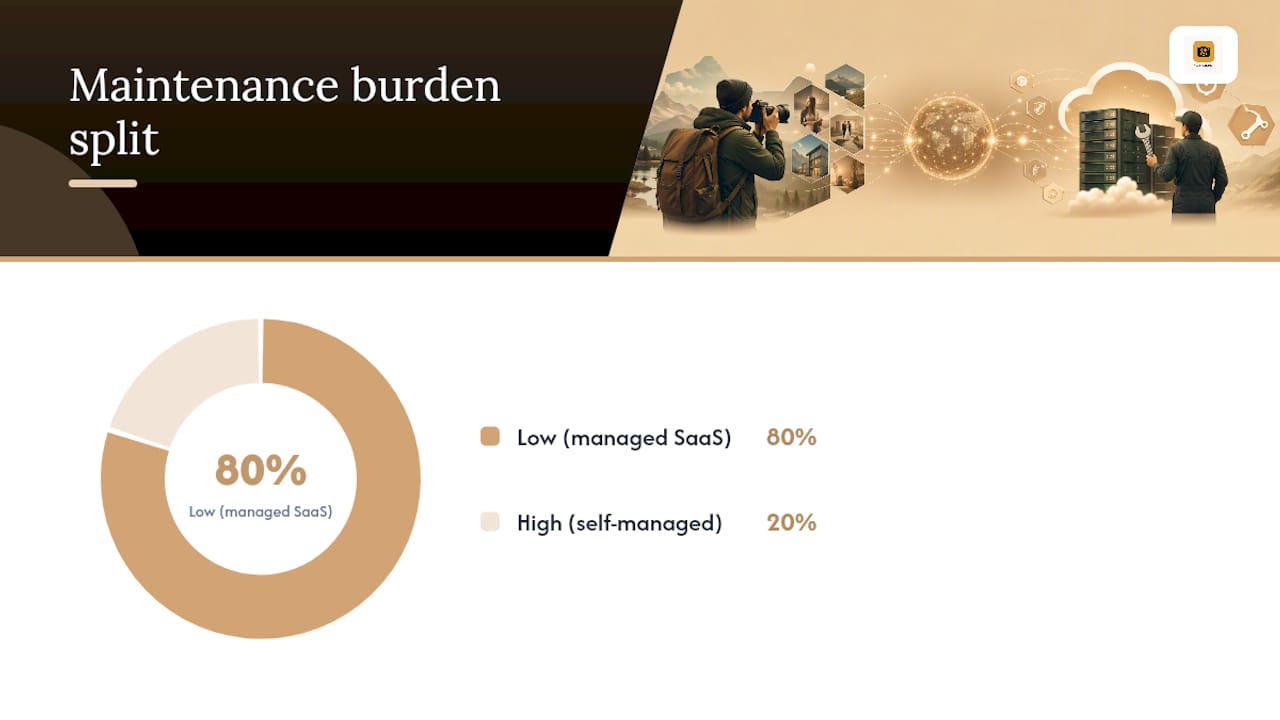
| PhotoView | Portfolio-first photographers needing Lightroom publish and private delivery | Very easy | 30+ responsive templates | Direct publish | Private sharing, live embeds | Limited | Storage-tiered subscription | Low (managed SaaS) |
| Wix | Quick visual design across many templates | Easy | Large general-purpose library | None native | Basic | Add-on stores | Tiered plans | Low (managed SaaS) |
| Squarespace | Design-forward setup with minimal fuss | Easy | Polished, design-led templates | None native | Basic | Built-in commerce | Tiered plans | Low (managed SaaS) |
| WordPress | Power users wanting full customization | Moderate to hard | Unlimited via themes/plugins | Via plugins/exports | Via plugins | Via plugins (WooCommerce) | Depends on host | High (self-managed) |
| SmugMug | Built-in print and digital sales | Easy | Photography-specific | Limited | Strong client galleries | Strong, native | Storage-tiered | Low (managed SaaS) |
| Pixieset | Client proofing and storefronts | Easy | Modern gallery layouts | None native | Strong | Print ordering built in | Storage-tiered | Low (managed SaaS) |
| Format | Creative portfolio with contracts | Easy | Curated, design-focused | None native | Delivery tools built in | Basic | Tiered plans | Low (managed SaaS) |
| Pixpa | Affordable all-in-one for photographers | Easy | Photography-focused | None native | Built in | Built-in store | Tiered plans | Low (managed SaaS) |
| SiteGround | Managed WordPress hosting | Moderate | Depends on WordPress theme | Via plugins | Via plugins | Via plugins | Hosting-tiered | Moderate (managed host, self-run CMS) |
| Bluehost | Budget WordPress starting point | Moderate | Depends on theme | Via plugins | Via plugins | Via plugins | Hosting-tiered | Moderate to high |
| Hostinger | Low-cost hosting entry | Moderate | Depends on theme | Via plugins | Via plugins | Via plugins | Hosting-tiered | Moderate to high |
| Kinsta | High-performance managed WordPress | Moderate | Depends on theme | Via plugins | Via plugins | Via plugins | Hosting-tiered, premium | Moderate (managed host) |
Three photographer profiles map cleanly onto this table. If you’re portfolio-first and want your best images live within minutes of a Lightroom export, start with PhotoView. If selling prints and digital files is your main revenue stream, start with SmugMug or Pixieset instead. If you want a fully custom site with no platform constraints and don’t mind ongoing upkeep, start with WordPress on managed hosting like SiteGround or Kinsta.
PetaPixel’s photographer-focused hosting review frames this exact decision as “built vs bought,” noting that all-in-one SaaS platforms trade some customization for dramatically lower maintenance. That trade-off is the single biggest fork in this whole decision, and it’s worth sitting with before you pick anything.
How Do the Top Photo Hosting Providers Actually Compare?
PhotoView
PhotoView is a presentation platform built specifically around the workflow of finishing a shoot and getting it in front of a client fast. A key feature offered is direct Lightroom publishing, allowing images to move from a catalog to a live, responsive portfolio without a manual export-upload cycle. That single detail changes how often a working photographer actually updates their site, because Lightroom integration is a high-leverage feature precisely because it removes duplicate work.
Beyond Lightroom, PhotoView gives you 30+ responsive portfolio templates, Smart Folders for automatic organization, private sharing links for client review, and live embeds so a gallery on your dashboard updates everywhere it’s published, including on an existing website. Pricing runs on storage tiers rather than flat feature gates, with plans that may vary for high-volume users. The verdict: if your priority is getting finished work online quickly and keeping client delivery private and polished, this is the most direct path there.
Wix
Wix gives photographers a large template library and a genuinely easy drag-and-drop builder. You can get a presentable site up in an afternoon, and the design flexibility is real. What it doesn’t offer natively is Lightroom publishing or dedicated proofing workflows, so photographers who lean on Wix for a portfolio often still export images manually and manage client delivery through a separate tool.
Squarespace
Squarespace’s reputation for design quality is earned, and its Squarespace SEO Automation features help ensure your photography site gains visibility with minimal fuss. Templates look clean without much tweaking, and the editor stays out of your way. For general-purpose photography sites, it’s a strong, low-friction option. The trade-off shows up around e-commerce depth and proofing, where dedicated photography platforms simply go further, and there’s no native Lightroom pipeline.
WordPress (self-hosted)
WordPress remains the only option here with genuinely unlimited customization, because you’re not working inside someone else’s platform. Combine it with a theme built for photographers and plugins for galleries, proofing, and commerce, and you can build almost anything. The cost is maintenance: self-hosted WordPress demands ongoing attention to core updates, plugin conflicts, and security patches, which is real time taken away from shooting. Managed WordPress hosts reduce that burden but don’t eliminate it.
SmugMug
SmugMug built its business on photographers who sell. Print fulfillment, digital download sales, and client galleries with password protection are all mature, well-tested features. Storage is generous relative to price, and the platform has been photography-specific since long before “portfolio SaaS” was a category. If your income depends on print sales volume, SmugMug’s commerce depth is hard to match.
Pixieset
Pixieset leans hard into proofing and delivery. Clients get a polished gallery to browse, favorite, and order prints from, and the workflow is built around the wedding and portrait photographer’s delivery day. Templates are modern but narrower in scope than a general site builder, which is by design.
Format
Format pairs a curated, design-forward template set with practical creative-business tools, including built-in contracts and client delivery features. It sits in an interesting middle ground between a pure portfolio tool and a business-operations tool for freelance photographers.
Pixpa
Pixpa targets photographers who want an all-in-one photography builder without paying premium prices. Store, proofing, and portfolio templates are bundled at a lower price point than several competitors, making it a reasonable fit for photographers early in building a paying client base.
SiteGround, Bluehost, and Hostinger
These three are general web hosts, not photography platforms, but they show up constantly in photographer hosting guides because WordPress needs somewhere to live. SiteGround is frequently recommended for WordPress-based photography sites because of consistent performance and support quality. Bluehost and Hostinger compete mainly on entry price, making them common starting points for photographers building their first WordPress site on a tight budget, with the understanding that you’ll still be managing the CMS yourself.
Kinsta
Kinsta occupies the premium end of managed WordPress hosting. Speed, uptime, and enterprise-grade infrastructure are the pitch, and it shows in the price. For a high-volume commercial photographer running a heavy WordPress site with large galleries and consistent traffic, that performance ceiling can matter more than the cost difference.
How Should You Choose the Right Platform for Your Photography Business?
Built vs. bought, explained simply
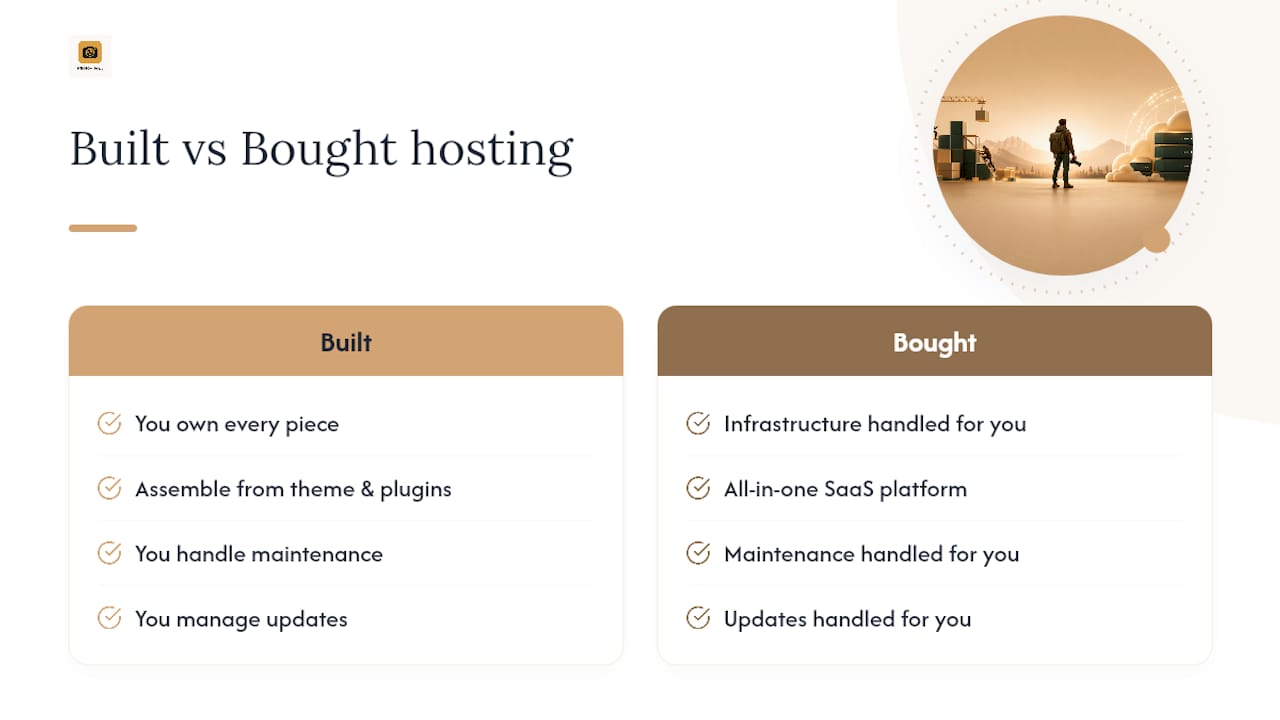
“Built” means WordPress or a similar CMS: you assemble the site from a theme, plugins, and hosting, and you own every piece. “Bought” means an all-in-one SaaS platform like PhotoView, Squarespace, or SmugMug, where the infrastructure, updates, and security are handled for you and you focus on content. Neither is objectively better. A wedding photographer publishing straight from Lightroom every week benefits enormously from a bought platform’s direct publish pipeline. A commercial photographer who needs a fully custom booking and invoicing flow might justify the extra maintenance of a built site.
Ranking the criteria that actually matter
Not every feature deserves equal weight. In rough order of impact on a working photographer’s week:
- Template and gallery flexibility — does it show your work the way you’d show it in person?
- Client proofing and delivery — can a client browse, favorite, and approve without an email chain?
- Lightroom integration — direct publish vs. manual export changes how often you actually update the site.
- E-commerce and purchase galleries — matters enormously if you sell, matters little if you don’t.
- Storage model and overage terms — check whether quotas cover only delivered images or original master files too, since that distinction gets buried in fine print.
- Speed and CDN performance — image-heavy sites live or die on load time, especially on mobile.
- Backups and security — who’s responsible when something breaks?
- Support responsiveness — how fast do you get a human when your site goes down before a client deadline?
Questions to ask before you sign up
- Does storage include original files, or only web-optimized copies?
- Is Lightroom Classic direct publish supported, or does it require plugins and manual export?
- Can I set truly private galleries with password protection, not just “unlisted” links?
- What happens to my site and files if I cancel or downgrade?
- Is there a real CDN behind image delivery, or does every load hit origin servers?
- Can clients favorite and order prints directly from a proofing gallery?
- What’s the actual support channel, and what are typical response times?
- Can I connect a custom domain without extra fees or lock-in?
- Are template changes free-form, or restricted once a site is live?
- What’s the overage cost if I exceed my storage tier mid-cycle?
Five red flags should stop a sign-up outright: no private gallery option, vague or undisclosed storage overage pricing, no export or Lightroom pipeline at all, no custom domain support, and support that only responds through a ticket queue with no stated turnaround.
Pro Tip: Before comparing pricing pages, time yourself doing the two tasks you’ll repeat weekly: uploading a finished gallery and sending it to a client for approval. The platform that makes that two-step process fastest is usually the right one, regardless of what the feature list says.
How We Evaluated These Photo Hosting Platforms
Every platform on this list was assessed against the same eight criteria: template flexibility, ease of use, Lightroom integration, client proofing, e-commerce depth, storage and pricing structure, maintenance burden, and custom domain support. These criteria were chosen because they map directly onto the weekly tasks a working photographer repeats: finishing a shoot, publishing it, sending it to a client, and getting paid.
Hands-on checks included reviewing template libraries for photography-specific design (not generic business templates repurposed for photos), testing proofing flows for how many clicks it takes a client to approve or purchase, confirming whether Lightroom publishing was native or required third-party plugins, and reviewing published pricing tiers rather than relying on promotional first-year discounts.
Pricing pages change often, and promotional first-term discounts can mask the real second-year cost. Always check the renewal price, not just the sign-up price, before comparing platforms on cost alone.
Limitations worth stating plainly: feature sets and pricing shift as platforms update, and some vendors run limited-time promotions that don’t reflect standard renewal pricing. This comparison reflects publicly available plans and features at the time of writing, not a locked-in guarantee of future terms.
A Portfolio-First Take on Choosing Photo Website Hosting
Most hosting comparisons treat photographers like generic small business owners who happen to sell images instead of consulting hours. That framing misses what actually matters: the gap between finishing a shoot and getting it in front of a paying client is where deals get won or lost, and most platforms make that gap wider than it needs to be.
The conventional wisdom says more customization is always better. I’d push back on that. A fully custom WordPress build looks impressive in a portfolio review, but if updating it eats an evening every time you finish a shoot, the customization is costing you more than it’s giving back. Photographers who publish consistently tend to book more consistently, and consistency depends on friction, not features.
That’s the entire argument for a portfolio-first, Lightroom-connected workflow. When publishing takes minutes instead of an evening, you publish more often, which means clients see fresher work, and the site actually does its job instead of sitting stale for three months. That said, PhotoView isn’t the right call for every photographer. If your business runs primarily on print sales volume, a commerce-first platform with deeper storefront tools deserves serious consideration. If you need a fully bespoke site architecture for reasons beyond portfolio presentation, self-hosted WordPress still wins on raw flexibility.
What I’d push you to reconsider is the assumption that flexibility is free. It never is. It costs time, and time is the one resource a working photographer can’t buy back.
— Mitch Russo
Try PhotoView for Your Next Portfolio Update
PhotoView exists for exactly the moment described above: finishing a shoot and needing it live, polished, and ready for a client without a night of exports and uploads. The direct comparison earlier in this piece makes the trade-off clear. Where competitors ask you to manually move images from editing software to a website, Some platforms publish directly from Lightroom catalogs.

What that gets you in practice:
- Direct Lightroom publish, so finished edits go live without a separate export-and-upload step
- 30+ responsive portfolio templates built for photography, not repurposed business layouts
- Private sharing links for client review and delivery, without exposing work publicly
- Live embeds that keep a gallery updated everywhere it’s published, including on an existing site
- Smart Folders for automatic organization and storage-tiered pricing that scales with your volume
If you’re a wedding, travel, fine art, or commercial photographer trying to reduce the gap between “shoot done” and “client sees it,” start a trial and explore the full solutions overview to see which plan fits your storage needs.
Sources
FAQ
Which Photo Hosting Site Is the Best?
There’s no single answer for every photographer, but PhotoView is the strongest choice for portfolio-first work with Lightroom publishing and private client delivery, while SmugMug and Pixieset lead for print and digital sales, and WordPress wins for photographers who want full customization.
Is Wix or Squarespace Better for Photographers?
Both are easy to use with strong templates, but neither offers native Lightroom publishing or the proofing depth of photography-specific platforms; Squarespace generally edges out Wix on design polish, while Wix offers more template variety.
What Website Platform Do Most Photographers Use?
Working photographers split between all-in-one photography platforms for portfolio presentation and client delivery, and WordPress paired with managed hosting like SiteGround for photographers who want full customization and don’t mind the added maintenance.
Do I Need Both a Portfolio Site and a Separate Sales Platform?
Some photographers do run a portfolio platform for public presentation alongside a dedicated proofing or sales tool, though platforms like SmugMug and Pixieset combine both functions, and PhotoView focuses specifically on portfolio presentation and private client delivery rather than storefront sales.