
Lightroom Publishing: Portfolio Platforms for Photographers
Choose a portfolio platform by publishing workflow, not templates. See which support Lightroom publishing, live embeds, and client proofing. PhotoView is...

Lightroom Publishing: Portfolio Platforms for Photographers
PhotoView is the strongest pick for photographers who want streamlined publishing, private sharing, and live embeds without fighting a general-purpose site builder. If your priority is design-forward flexibility with built-in commerce, Squarespace fits. For maximum design control at the code level, Webflow wins. For a single-page portfolio you can launch in an afternoon, Carrd handles it with no learning curve.
TL;DR:
- PhotoView offers direct Lightroom publishing and live embeds, making it ideal for photographers who regularly update galleries without manual uploads.
- Workflow efficiency is crucial, with PhotoView streamlining updates across websites and client proofing, unlike platforms that require manual image management.
- Platforms like Squarespace and Wix are more suited for design-focused portfolios with templates and e-commerce but lack integrated publishing from editing tools.
- Load times on mobile devices are a key consideration; testing actual image sets on cell data reveals platform performance differences that impact user experience.
- The best choice depends on your priority: photographers benefit from PhotoView’s workflow, while those needing a high level of design control should consider Webflow or Framer.
PhotoViewphotoview.ioPublish Your Portfolio More EasilyPhotoView connects Lightroom publishing, curated galleries, private sharing, and live embeds in one platform built for photographers.Explore PhotoView
Table of Contents
- What Are the Best Portfolio Platforms Right Now?
- How Do These Platforms Compare on Workflow, Not Just Looks?
- How Do You Choose the Right Portfolio Platform?
- What Does a Photographer-First Publishing Workflow Look Like?
- When Should You Choose a Lightweight Builder Instead?
- Try PhotoView for Your Photography Portfolio
- Sources
- FAQ
What Are the Best Portfolio Platforms Right Now?
Choosing among the best portfolio platforms comes down to one question most comparisons skip: how does your actual work get from your camera or design tool onto the page? Templates matter, but they’re the easy part. Publishing workflow, image handling, and client sharing are where platforms actually diverge.
Here’s a ranked shortlist built around that reality, with PhotoView first because it’s built specifically for the publish-and-present loop that photographers repeat every week.
- PhotoView — the photographer-first platform for publishing and live embeds.
- Squarespace — the design-forward all-in-one builder with commerce baked in.
- Webflow — the visual canvas for near-code design control.
- Wix — the flexible drag-and-drop builder with a huge template library.
- Adobe Portfolio — the fast, low-cost launch for Creative Cloud subscribers.
- Showit — the visual builder favored by wedding photographers who blog.
- Framer — the design-led platform for motion and interaction.
- Pixpa — the photography builder with proofing and print sales.
- Format — the freelancer-friendly builder with client-proofing tools.
- Carrd — the ultra-simple one-page site for minimal portfolios.
- WordPress.org — the self-hosted option for maximum extensibility.
PhotoView
- Best for: professional photographers who need Lightroom publishing, private galleries, and live embeds without rebuilding their site each time.
- Standout feature: Smart Folders and direct Lightroom publishing that pushes finished work straight to your gallery.
- Pricing shape: paid plans start with the Starter tier, no free-forever plan, but the workflow savings show up fast for working photographers.
- One limitation: it’s built around photography and video presentation, so it isn’t the tool for a multi-page marketing site with unrelated content types.
Squarespace
- Best for: design-focused creatives who want polished templates and integrated e-commerce in one subscription.
- Standout feature: high-quality templates that make a portfolio look art-directed with minimal setup, a strength reviewers consistently point to.
- Pricing shape: free trial, then tiered monthly or annual plans.
- One limitation: image-heavy photography workflows still require manual uploads rather than a direct publish-from-editor pipeline.
Webflow
- Best for: designers and developers who need pixel-level control and custom interactions.
- Standout feature: a visual canvas that outputs clean code, paired with a flexible CMS.
- Pricing shape: free starter tier for testing, paid plans for hosting and CMS features.
- One limitation: the learning curve is real. Casual users often find it more builder than they need.
Wix
- Best for: users who want an easy editor with marketing tools bundled in.
- Standout feature: a huge template library and a beginner-friendly drag-and-drop editor.
- Pricing shape: free plan with Wix branding, paid tiers to remove it and add features.
- One limitation: heavy customization can slow the editor down as a site grows.
Adobe Portfolio
- Best for: designers already paying for Creative Cloud who want a fast, no-extra-cost portfolio.
- Standout feature: it’s included with Creative Cloud, making speed to launch its biggest draw.
- Pricing shape: no separate charge if you already subscribe to Creative Cloud.
- One limitation: template flexibility is limited compared to dedicated builders.
Showit
- Best for: photographers, especially wedding photographers, who depend on blog-driven SEO for bookings.
- Standout feature: unrestricted visual design paired with WordPress blog integration.
- Pricing shape: paid subscription, no permanent free tier.
- One limitation: the visual freedom means more setup time than a template-locked builder.
Framer
- Best for: design-led creatives who want advanced animation and interaction.
- Standout feature: a Figma-like canvas with motion controls most builders don’t offer, occupying a distinct niche from photography-first tools.
- Pricing shape: free plan for basic sites, paid tiers for custom domains and CMS.
- One limitation: it rewards design skill. Photographers without design background may find it slower to use than a template gallery.
Pixpa
- Best for: photographers who want watermarking, proofing, and print sales on one platform.
- Standout feature: progressive image loading and integrated e-commerce for print sales.
- Pricing shape: free trial, then tiered monthly plans.
- One limitation: template range is narrower than general-purpose builders like Wix or Squarespace.
Format
- Best for: freelance photographers who need simple client-proofing without a full studio setup.
- Standout feature: portfolio templates paired with straightforward proofing tools.
- Pricing shape: free trial, paid subscription afterward.
- One limitation: fewer advanced customization options than a full visual builder.
Carrd
- Best for: creators who need one clean page, not a multi-section site.
- Standout feature: it’s fast, cheap, and refuses to overcomplicate a single-page portfolio.
- Pricing shape: free tier available, paid tier is inexpensive by comparison to full site builders.
- One limitation: it’s not built for multi-gallery portfolios or e-commerce.
WordPress.org
- Best for: creators who want full control over plugins, hosting, and advanced SEO.
- Standout feature: an enormous plugin ecosystem that can extend a portfolio into almost anything.
- Pricing shape: the software is free, but hosting, themes, and plugins add ongoing cost.
- One limitation: you own the maintenance. Updates, security, and backups are on you, not a vendor.
Other platforms worth knowing by name, even if they didn’t make the top eleven: Journo Portfolio and Muck Rack serve journalists building clip-based portfolios; Behance and Flickr work as free portfolio-adjacent communities rather than standalone sites; Clippings.me, Krop, and YouPic serve niche creative and photo communities; Siter.io, Fabrik, Crevado, Dunked, and Portfoliobox are smaller no-code builders with basic gallery templates; and Notion along with newer tools like Trickle AI get used informally for quick portfolio pages, though neither was built for image-heavy creative work.
How Do These Platforms Compare on Workflow, Not Just Looks?
Most portfolio comparisons stop at template screenshots. That’s the wrong axis. The differences that actually affect your week are publishing workflow, design control, image delivery, and whether blogging matters to your business.
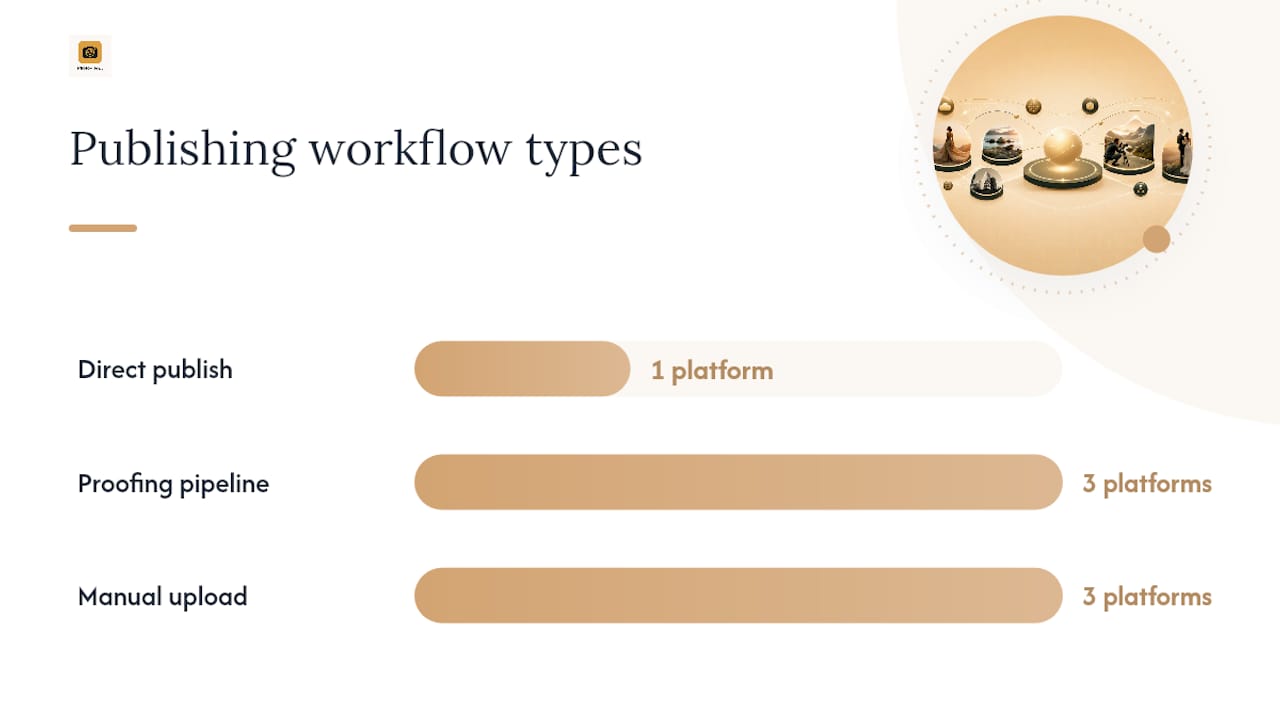
Publishing workflow separates the platforms fastest. PhotoView publishes directly from Lightroom through Smart Folders, so a finished edit reaches your live gallery without a separate export-and-upload step. Format and Pixpa build client-proofing into the same pipeline, useful if you deliver galleries for approval before final selects. Squarespace, Wix, and Webflow require manual upload; there’s no editor-to-web pipeline built in. Hands-on reviews consistently note that image-heavy portfolios need both good media delivery and simple publishing from editing tools to feel effortless rather than administrative.
Design control runs on a spectrum. Template-driven platforms like Squarespace, Wix, and Adobe Portfolio give you curated layouts you customize within limits. Full visual canvas tools like Webflow and Framer let you build custom interactions and layouts from near-scratch, which is powerful but demands design fluency. PhotoView sits closer to the curated end, offering 30+ responsive templates rather than a blank canvas, trading unlimited flexibility for speed and consistency across devices.
Media delivery matters more than most photographers realize until a gallery loads slowly on mobile data. Progressive loading, CDN-backed delivery, and responsive image sizing determine whether a 40-image gallery feels instant or sluggish. This is a bigger differentiator between platforms than most comparison charts admit.
Blogging and SEO support should only sway your decision if bookings actually come from search traffic. Photographers who depend on blog SEO for bookings do better on platforms like Showit that integrate with WordPress; everyone else gets more value from proofing and Lightroom integration than from blog tooling they’ll rarely touch. If SEO is a real growth lever for your business, pairing your platform choice with dedicated photography SEO services tends to move the needle faster than blog features alone.
Here’s what actually differs across the field:
- Lightroom-to-web publishing: PhotoView offers direct publishing; most general builders don’t.
- Client proofing: Format, Pixpa, and PhotoView build it in; Wix and Squarespace don’t offer it natively.
- Live embeds on an existing site: PhotoView supports this without a rebuild; most template builders require replacing the whole site.
- Design ceiling: Webflow and Framer go highest; template platforms cap out sooner but need far less setup time.
Pro Tip: Before you commit to any platform, upload your 10 heaviest, highest-resolution images and check load time on mobile data, not just office WiFi. A gallery that looks great on a fast connection can crawl on a phone at a coffee shop, and that’s exactly where a client might be viewing it.
How Do You Choose the Right Portfolio Platform?
Run this as a short process rather than an open-ended search. Most photographers spend more time browsing templates than actually testing the thing that will frustrate them later: the publishing step.
- Define your goal first. Are you booking clients, applying for jobs, or selling prints? The answer changes which features matter.
- Test the workflow with your own files, not demo images. Upload a real shoot and see how many clicks it takes to go from finished edit to live gallery.
- Publish something and time it. Note how long the upload takes and how the gallery loads on a phone, not just your desktop monitor.
- Test client sharing and proofing if you deliver galleries for approval. Send yourself a private link and see how it looks from the client’s side.
- Confirm domain, SEO, and e-commerce needs before you build anything permanent. Custom domain support and print-sales integration aren’t universal.
- Compare total first-year cost, not just the monthly rate, including any add-ons for storage, e-commerce, or removing platform branding.
When you’re on a demo call or trial, ask direct questions: does the platform support Lightroom publishing, and if so, how? Is there an image storage limit, and what happens when you hit it? Are backups automatic or your responsibility? Can you set galleries to private with a shareable link? And critically, if you leave, do you keep your images and export your content, or does it stay locked in?
Timeline expectations vary widely. A template-based platform like Squarespace or PhotoView can go live in a day once your images are ready. A fully custom Webflow or WordPress.org build often takes several weeks, especially if you’re hiring a developer. Cost bands follow a similar pattern: free or near-free tiers cover basic single-page sites, mid-tier plans in the $10 to $30 monthly range cover most working photographers, and studio-level plans with higher storage or advanced e-commerce push higher.
Pro Tip: Use one real project, not scattered favorites, when testing platforms during a trial. A consistent set of three to five images reveals platform limits far faster than browsing templates ever will, because you’ll notice cropping, loading, and layout issues on your actual work instead of stock photography built to look good everywhere.
What Does a Photographer-First Publishing Workflow Look Like?
PhotoView was built around one habit every working photographer already has: editing in Lightroom, then needing that edit live somewhere fast. The core features work toward that single loop rather than toward general website flexibility.
- Lightroom publishing pushes finished edits straight to your gallery through Smart Folders, cutting out the export-download-upload cycle most builders require.
- Live embeds keep an existing website’s portfolio section current from one dashboard, so you’re not maintaining two versions of your work.
- Private galleries let you share unpublished work with a single client link, without making it publicly searchable.
- Multiple galleries and mixed media support different bodies of work, including video, inside one account.
- Custom domains and 30+ responsive templates cover the presentation side without a separate design tool.
Two workflows show how this plays out. First, a wedding photographer finishes color grading a gallery in Lightroom, publishes it through a Smart Folder, and the couple’s embedded gallery on the studio’s existing WordPress site updates automatically, no manual re-upload, no second login. Second, a commercial photographer builds a private proofing gallery for a client review, shares a single link with view-only access, and once selects are locked, republishes the same set as a public portfolio piece without duplicating files.
Photographer-focused SaaS platforms like this one reduce the administrative overhead that general site builders leave on the photographer’s plate, since proofing, private sharing, and direct publishing aren’t retrofitted onto a template system, they’re the starting point.
Update your work once, and it stays current everywhere it’s displayed: on your site, embedded elsewhere, and on mobile. That’s the standard PhotoView was built to meet for working photographers who don’t have time to rebuild a gallery every time a new shoot wraps.
Readers who want to see the template range or the Lightroom integration in more depth can look at PhotoView’s photography website templates or the dedicated Lightroom publishing solution page.
When Should You Choose a Lightweight Builder Instead?
Not every photographer needs the same class of tool, and pretending otherwise does readers a disservice.
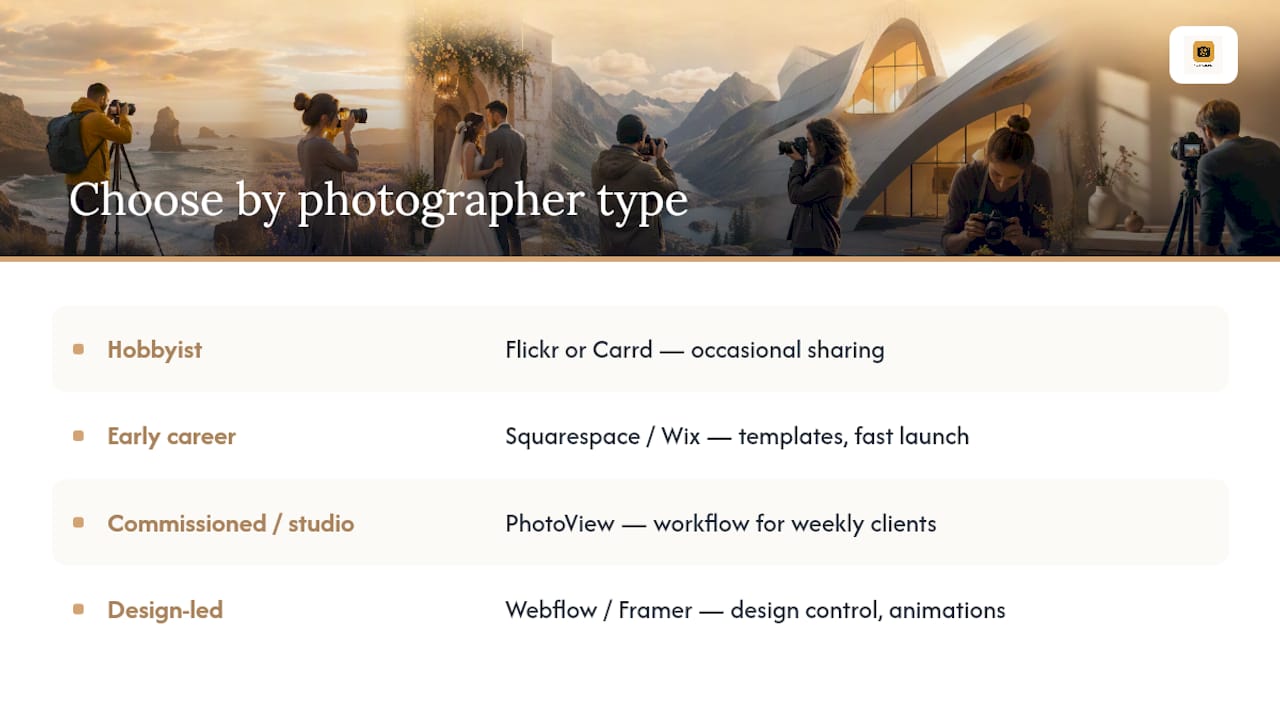
A hobbyist sharing occasional shoots with friends is fine on Flickr or a Carrd page. No workflow to protect, no clients to manage. An early-career photographer building a first portfolio to land gigs benefits from a template-driven builder like Squarespace or Wix, speed matters more than deep publishing integration at that stage. A commissioned or studio photographer juggling client proofing, repeat shoots, and Lightroom exports every week is exactly who a platform like PhotoView was built for: the workflow savings compound with volume. A design-led creative building an experimental, animation-heavy portfolio is better served by Webflow or Framer, where control matters more than publishing speed.
Each choice trades something: lightweight builders trade long-term workflow efficiency for setup speed, and full-canvas tools trade ease for design ceiling. If your work is photography-first and repeats weekly, that trade tends to favor a platform built around your actual publishing habit, not just your template preferences.
— Mitch Russo
Try PhotoView for Your Photography Portfolio
PhotoView gives working photographers the one thing template builders don’t: a publishing workflow that starts in Lightroom and ends live, without a manual export step in between. If you’ve been comparing Squarespace, Wix, or Webflow and stalling on the upload process, that’s the gap PhotoView was built to close.

Every plan includes all 30+ responsive templates, custom domains, private sharing for client proofing, and live embeds that update your existing site from one dashboard. Pricing starts at $3.99 per month for the Starter plan (or $39.99 billed annually), scaling up through Growth, Studio, and Premier as your storage and gallery needs grow. If you want to keep your current site and just add a live, always-current portfolio section, the embed solution handles that without a rebuild.
Start a trial, publish one real gallery from Lightroom, and time how long it takes. That single test tells you more than a week of template browsing.
Sources
These are the reviews and reference pages worth reading if you want to verify or dig deeper into any comparison made here:
- The 3 Best Portfolio Website Builders Tested 2026
- Framer for Photographers: An Honest 2026 Review
- Adobe Portfolio Review: Is It Worth It for Designers in 2026?
FAQ
What Is the Best Platform to Build a Portfolio On?
It depends on your priority: PhotoView suits photographers who want Lightroom publishing and live embeds handled for them, while Squarespace suits design-focused creatives who want polished templates with built-in commerce. Webflow suits anyone who wants full design control instead of a template.
What Are the Top Portfolio Websites in 2026?
The strongest options for photographers and designers include PhotoView, Squarespace, Wix, Webflow, Adobe Portfolio, Showit, Framer, Pixpa, Format, Carrd, and WordPress.org. Each fits a different priority, from Lightroom-driven publishing to full custom design control.
What Is the Best Website to Create a Portfolio?
For photographers, PhotoView centers the workflow around Lightroom publishing, private proofing, and live embeds rather than manual uploads. For design-forward, non-photography portfolios, Squarespace or Webflow tend to be the stronger starting points.
Can ChatGPT Make a Portfolio?
ChatGPT and similar AI tools can generate a basic portfolio skeleton or layout idea, but building a production-ready professional portfolio still requires manual follow-up work. AI doesn’t replace platform features like Lightroom publishing, client proofing, or CDN-backed image delivery that a dedicated portfolio platform provides.
How Much Does PhotoView Cost?
PhotoView’s plans start at $3.99 per month for Starter, billed monthly, or $39.99 annually. Growth, Studio, and Premier tiers scale up in storage and features, with custom pricing available for high-volume photographers.