
Photography Contact Page That Books: 24 Hour Reply and Copyable Fields
Make your photography contact page book more clients with a short, mobile first form, instant autoresponder, and copyable field templates.

Photography Contact Page That Books: 24 Hour Reply and Copyable Fields
The single change that moves the needle most on a photography contact page is replacing a bare email address with a short structured form, clickable contact options, and an instant automated reply. That combination alone answers the client’s first question (did this reach a real person?) while quietly collecting the shoot details you need to send a meaningful first response. Everything below shows you exactly which fields to use, how to lay them out, and what to say in that first automated email.
TL;DR:
- Using a structured contact form with fields for shoot type, date, and location, along with an instant automated reply, streamlines lead qualification and reduces back-and-forth.
- Prioritizing a click-to-email link, a visible phone number if answered, and a clear CTA above the form ensures core contact options and sets expectations from the start.
- Designing mobile-friendly forms with stacked fields, large buttons, and minimized typing improves user experience and increases successful inquiries.
- Implementing conditional logic in the form, such as follow-up questions based on shoot type, prevents overwhelming clients with unnecessary questions upfront.
- Automating follow-up emails, CRM integration, and scheduling links accelerates responses and prevents inquiries from getting lost or delayed.
PhotoViewPresent Your Photography EverywherePhotoView helps photographers store, curate, and publish portfolios, presentations, and website embeds from one dashboard.Explore PhotoView
Table of Contents
- What Belongs on a Photography Contact Page?
- Which Fields Should Your Photography Booking Page Actually Ask For?
- How Should Your Contact Form Look on Mobile?
- How Do You Qualify Leads Without Scaring Them Off?
- What Automation Actually Moves Bookings Forward?
- Is Your Contact Form Actually Working? Test It Like This
- Copy-Paste Templates for Your Form and Autoresponder
- What I’ve Learned Watching Photographers Fix Their Contact Pages
- The Advice Nobody Questions, and Where It Falls Short
- How PhotoView Turns Your Contact Page Into a Complete Lead Workflow
- Sources
- FAQ
What Belongs on a Photography Contact Page?
Every photography contact page needs three non-negotiable elements: a click-to-email link, a visible phone number if calls are part of how you actually work, and an embedded contact form that does more than just collect a name and message. Anything past that is optional polish, not a requirement.
A round-up of contact-page essentials puts it plainly: the absolute floor is an email link, a location or service area, and a working contact form. Phone numbers, scheduling links, social icons, a map, and an FAQ section are useful extras, not requirements. Skip them if they clutter the page; add them back once your core form is converting.
Here’s the audit checklist to run against your own page right now:
- Click-to-email link and visible phone number (only if you actually answer calls or texts, since a listed number nobody picks up hurts more than it helps)
- A one-line intro or CTA above the form that tells the visitor exactly what happens next (“Tell me about your day and I’ll reply within 24 hours”)
- An embedded form that captures shoot type, date, and location, not just “message”
- A clear submit button with a stated response time, since “Send” tells the visitor nothing and “Get Your Free Quote” or “Send Inquiry” does
- Optional secondary contact methods, like a scheduling link or Instagram icon, placed below the fold so they don’t compete with the primary form
Most photographers get the first two right and stop there. The form is where bookings actually get won or lost, and that’s the piece worth the most attention.
Which Fields Should Your Photography Booking Page Actually Ask For?
The fields you choose determine whether an inquiry arrives ready to quote or forces you into three rounds of clarifying emails before you even know if the date works. Structured forms that collect shoot type, date, location, and budget upfront cut that back and forth dramatically, according to what clients ask photographers, which recommends exactly this core set for photographer inquiry forms.
Here’s the field hierarchy that keeps your form short while still qualifying leads:
- Required fields: full name, email address, shoot type (dropdown: wedding, portrait, commercial, headshot, other), preferred date or date range, and location or service area.
- Recommended qualifiers: a binned budget range (not an open text box), estimated hours or coverage needed, and group size or number of deliverables expected.
- Conditional follow-ups, shown only after the shoot type is selected: venue name and guest count for weddings, product specs and quantity for commercial work, or preferred background style for headshots.
- Consent and privacy: a required checkbox confirming the client agrees to your privacy policy, plus a separate, clearly optional opt-in for a newsletter or mailing list. Never bundle the two into one checkbox.
Conditional logic is what makes this list work without turning your form into a ten-field wall of text. Template providers now build this in by default, letting a wedding inquiry trigger venue and guest-count fields while a headshot inquiry skips straight to background preferences.
Pro Tip: Never make budget a free-text field. An open box invites vague answers or awkward silence. Binned ranges like “$2,000–$4,000” or “$4,000+” let hesitant clients self-select without feeling put on the spot.
Downloadable starting points exist if you’d rather adapt than build from scratch. Jotform’s photography contact form template includes contract-style fields and signature capture, useful if you want the inquiry form and booking agreement to live closer together.
How Should Your Contact Form Look on Mobile?
Most inquiries now arrive from a phone, and a form built for desktop first will lose those visitors before they finish typing. Design for the smallest screen, then let the desktop version inherit that clarity.
A few rules make the difference:
- Stack fields in a single column. Side-by-side fields that looked fine on a laptop turn into a pinch-and-zoom mess on a phone.
- Make CTA buttons large and thumb-friendly. A button that’s easy to miss on a 6-inch screen costs you submissions you’ll never know you lost.
- Cut typing wherever possible. Use dropdowns for shoot type, a native date picker for the wedding date, and the
telinput type for phone numbers so mobile keyboards switch to numeric automatically. - Set expectations in microcopy. A line under the submit button like “We typically reply promptly” or “A 30% deposit secures your date” removes the anxiety of sending a message into a void.
- Build for accessibility from the start. Every field needs a visible label (not just placeholder text, which disappears the moment someone starts typing), a logical tab order, and ARIA attributes on custom dropdowns so screen readers can announce them correctly.
None of this requires a developer. Most modern form builders and website platforms handle labels, tab order, and mobile input types automatically once you choose the right field type.
How Do You Qualify Leads Without Scaring Them Off?
The tension every photographer faces is real: ask too much upfront and people abandon the form; ask too little and you spend your evening emailing back and forth with someone whose budget was never close to yours. The fix isn’t asking fewer questions. It’s asking the right ones in the right order.
- Bin your budget field and make it optional, not required. A required budget question feels like an interrogation. An optional one with clear ranges feels like you’re trying to help them plan.
- Use conditional logic to keep the first screen short. Insight from Typeform’s approach to photography inquiries treats the form as a marketing tool, not just an intake mechanism. Personalizing questions based on shoot type keeps the experience feeling tailored instead of exhausting.
- Set expectations in your site copy before the form even loads. A line near the top like “Wedding coverage typically starts at $X” filters out mismatched inquiries before they type a word.
- Write your first-reply template in advance. A response that references their specific date and shoot type, sent within hours, moves the conversation forward far faster than a generic “thanks for reaching out.”
Pro Tip: Put your starting price range in your site copy, not just your form. Clients who are priced out will self-select away before they ever open the contact page, saving you both time.
What Automation Actually Moves Bookings Forward?
An inquiry that sits in your inbox for two days is an inquiry that’s probably already talking to someone else. The minimum automation stack for a photography contact page has three parts: an instant confirmation email, a connection to wherever you track leads, and a booking or scheduling link that removes the need for a back-and-forth just to find a date that works.
- Instant confirmation email sent the moment the form submits, ideally including a link to a curated portfolio gallery. Research on inquiry-form design found that giving clients something to review while they wait for a personal reply builds trust during the gap between inquiry and response.
- Form-to-CRM integration so every submission becomes a tracked lead instead of a buried email you might forget to follow up on.
- Form-to-calendar or booking-link integration, letting qualified leads pick an available consultation slot without a single extra email exchange.
- A short, visible booking policy wherever the scheduling widget lives. Examples from working photographer booking pages show that stating reschedule and cancellation rules right in the booking flow, not buried in fine print, cuts down on no-shows and confused clients.
Form builders with built-in automation can push submissions straight into a CRM, trigger instant quotes, or even connect to payment tools for deposits, turning what used to be a manual admin chore into something that runs while you’re on set.
Is Your Contact Form Actually Working? Test It Like This
A form that looks finished isn’t the same as a form that works. Run through this before you consider the page done:
- Test client-side and server-side validation. Submit the form with a missing required field, a malformed email, and a date in the past to confirm error messages appear clearly and the form doesn’t silently fail.
- Choose your spam defense deliberately. A honeypot field (invisible to humans, irresistible to bots) blocks spam without adding friction. A CAPTCHA is more aggressive protection but costs you a small percentage of real submissions who abandon the extra step.
- Verify your sending domain. Set up SPF and DKIM records so your confirmation emails land in inboxes instead of spam folders. This is the single most overlooked reason automated replies never get read.
- Run a cross-device test plan. Submit from a phone, a tablet, and at least two browsers, and confirm every automation trigger (confirmation email, CRM push, calendar sync) actually fires each time.
Guidance on contact-page essentials reinforces this: testing form behavior and confirming deliverability before launch catches problems no amount of design polish will fix later.
Copy-Paste Templates for Your Form and Autoresponder
Two form structures cover most photographers. A minimal required-only version asks for name, email, shoot type, date, and location, nothing else, ideal if you’d rather filter through a quick phone call. An expanded conditional version adds binned budget, hours, and shoot-specific follow-up questions, better if you want to quote directly from the inquiry.
Your autoresponder subject line matters more than the body. Something like “Got your inquiry, [Name]!” outperforms a generic “Thank you for contacting us” because it confirms a real person is behind it.
- Autoresponder body (three sentences): “Thanks for reaching out about your [shoot type] on [date]! I typically reply personally within 24 hours with availability and pricing. In the meantime, here’s a look at recent work: [portfolio link].”
- CTA line for the contact page: “Tell me about your day, and I’ll get back to you with availability within one business day.”
- Placeholder microcopy example: instead of “Message,” use “Tell me a bit about what you’re planning.”
Pairing that autoresponder link with a curated portfolio page gives the client something worth clicking while they wait, rather than a dead link or a static “thanks” page.
What I’ve Learned Watching Photographers Fix Their Contact Pages
The most common mistake isn’t a missing field. It’s a contact page that asks nothing at all beyond “Message,” forcing every single lead into a manual back-and-forth that a two-minute form setup would have solved. The second most common mistake is the opposite extreme: a ten-field form with no conditional logic that scares off exactly the clients a photographer most wants to book.
The fix is rarely complicated. Adding a shoot-type dropdown with conditional follow-ups, or simply putting a response-time promise under the submit button, tends to raise the quality of inquiries without raising the abandonment rate. Photographers who make that one change often notice fewer “just checking prices” messages and more inquiries that already include a real date and a real budget range.
The Advice Nobody Questions, and Where It Falls Short
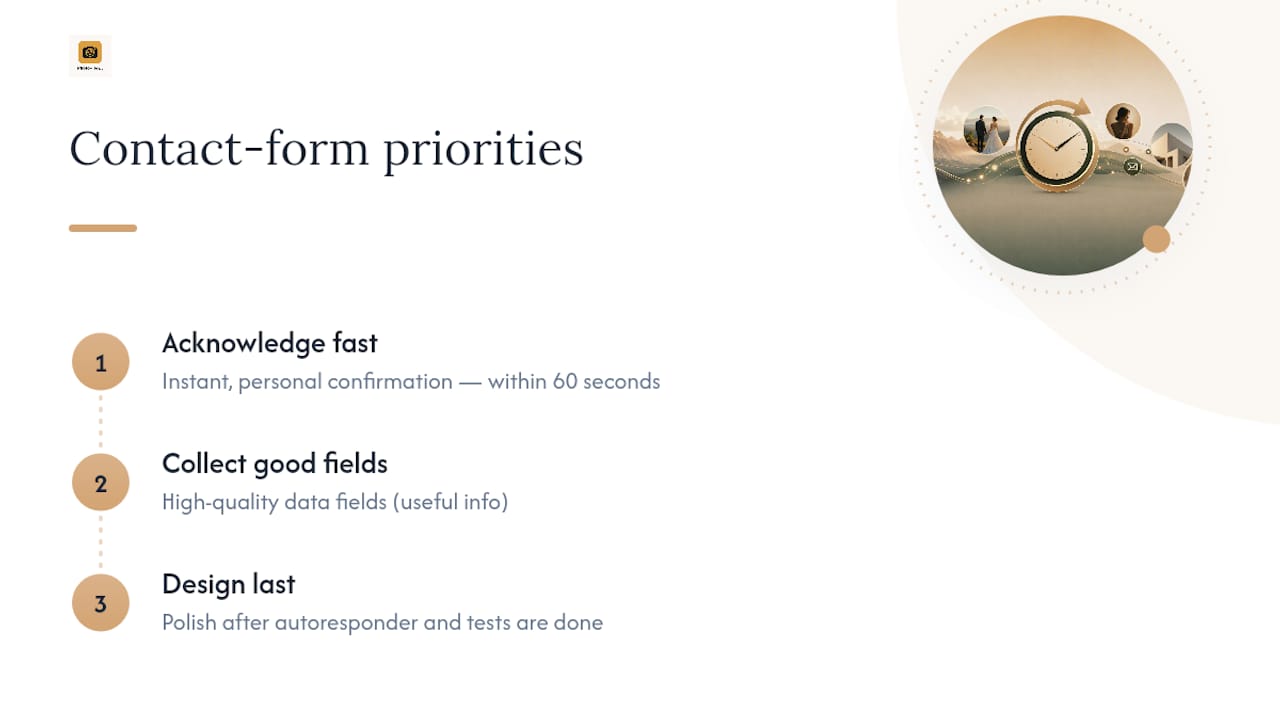
Most guidance on this topic treats the contact form as a checkbox: add fields, add a button, done. That advice isn’t wrong, but it stops short of the part that actually matters, which is what happens in the sixty seconds after someone hits submit. A form that collects perfect data and then leaves the client waiting three days for a reply loses just as many bookings as a form with no fields at all.
The priority order the evidence actually supports is speed of acknowledgment first, field quality second, and design polish a distant third. A plain form with an instant, personal-sounding confirmation will out-convert a beautifully designed one that goes silent for two days. Photographers chase visual design because it’s satisfying to fix. The unglamorous work, wiring up an autoresponder and testing that it actually fires, is what determines whether an inquiry turns into a client. Start there before you touch a single font choice.
— Mitch Russo
How PhotoView Turns Your Contact Page Into a Complete Lead Workflow
Building the form is only half the job. What happens after someone hits submit, whether they land on a slow, generic thank-you page or a fast, curated gallery that makes them want to book, often decides whether that inquiry turns into a client. There are platforms that combine portfolio, galleries, and website management into a single dashboard, enabling the link you send in an autoresponder to be a real, mobile-optimized presentation of your best work instead of a placeholder page.

Pick one of the 30-plus responsive portfolio templates to pair with your contact form, and the portfolio link in your confirmation email points somewhere worth clicking. Some services allow publishing directly from Lightroom, updating galleries from one dashboard, and enable embedded content on existing sites to refresh automatically as new work is added. If your workflow already includes private client galleries, PhotoView’s private sharing tools handle that alongside your public portfolio, so the lead you just qualified through your contact form has somewhere real to go next.
Start a trial at Photoview and see how quickly a finished gallery link can replace a generic “thanks for reaching out” page.
Sources
- Free Photography Contact Form template — Typeform
- Photography Contact Form — Jotform form template
- Photography contact form to automate bookings — ConvertCalculator
FAQ
How Do You Create a Photography Contact Sheet?
A contact sheet in the traditional sense (a grid of thumbnail proofs) is different from a contact page. Most photographers now build a digital equivalent by curating a gallery of selects and sharing it as a private link rather than printing physical proof sheets.
How Many Photographers Earn Over $300,000 a Year?
Reliable, current data on this specific income bracket isn’t publicly available, and figures vary widely by specialty, location, and business model. Commercial and high-volume wedding photographers with strong referral pipelines tend to report the highest earnings in the industry.
What Is the 20/60/20 Rule in Photography?
Definitions of this rule vary depending on the source, and it isn’t a standardized industry framework. Some photographers use a version of it to describe splitting shoot time between setup, main shooting, and wrap-up, but treat any specific breakdown you find as a rule of thumb rather than an established standard.
What Website Platform Do Most Photographers Use?
There’s no single dominant platform across the industry, but photographers increasingly favor tools built specifically for visual portfolios over generic website builders, since dedicated platforms like PhotoView handle gallery templates, Lightroom publishing, and live embeds without extra plugins.
Should I Use a CAPTCHA or a Honeypot Field on My Contact Form?
A honeypot field blocks spam invisibly with zero friction for real visitors, while a CAPTCHA offers stronger protection at the cost of a small drop in completed submissions. Start with a honeypot and only add a CAPTCHA if spam volume becomes a real problem.