
PhotoView.io: PicDrop Alternative for Lightroom Photographers
Why PhotoView.io is the PicDrop alternative for Lightroom photographers. Compare storage, proofing, and commerce to pick the right tool for print, event,...

PhotoView.io: PicDrop Alternative for Lightroom Photographers
One strong replacement for PicDrop pairs private client delivery with portfolio publishing and Lightroom integration in one subscription. If you shoot events at scale, FotoOwl’s face recognition and guest delivery tools fit better. Everyone else falls somewhere between those three priorities.
TL;DR:
- PhotoView.io offers a combined solution for portfolio publishing and secure client delivery, with Lightroom integration, but is less suited for high-volume event guest delivery or print sales.
- Pixieset provides an integrated system with galleries, online store, and basic site-building, making it a versatile all-in-one alternative for photographers seeking more commerce features.
- ShootProof emphasizes print sales with no commission and lab partnerships, though its presentation and portfolio tools are secondary to sales and fulfillment functions.
- CloudSpot delivers affordable, essential proofing and business tools for solo photographers, with a free tier suitable for those with limited storage and sales needs.
- FotoOwl specializes in managing large event guest lists via face recognition and WhatsApp delivery, excelling at guest self-service rather than general portfolio or year-round business functions.
PhotoViewPresent Your Work Beyond DeliveryPhotoView combines secure client delivery, Lightroom publishing, and responsive portfolio templates in one platform for photographers.Explore PhotoView
Table of Contents
- Why Photographers Look for PicDrop Alternatives
- Which PicDrop Alternative Fits Your Workflow?
- How Do These Platforms Compare on Storage, Proofing, and Commerce?
- What Makes Each PicDrop Alternative Different?
- How Do You Choose the Right PicDrop Replacement?
- How We Evaluated These PicDrop Alternatives
- When PhotoView Makes Sense, and When It Doesn’t
- Ready to Replace PicDrop With a Portfolio That Works Harder?
- Sources
- FAQ
Why Photographers Look for PicDrop Alternatives
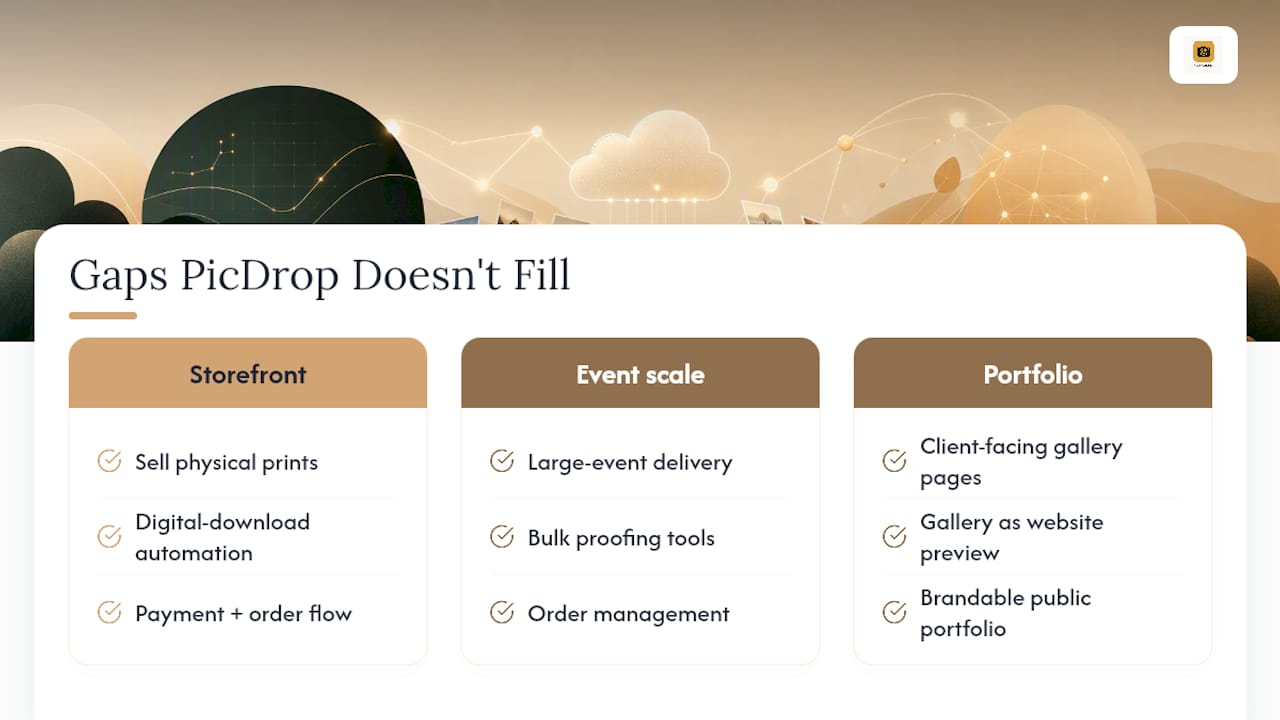
PicDrop earns its following for a reason: it delivers files fast, and its Lite, Pro, and Business tiers keep proofing simple. But that simplicity is the ceiling, not just the floor. PicDrop intentionally separates delivery from storefront functionality, which means there’s no built-in way to sell prints, run digital-download automation, or turn a delivered gallery into a client-facing portfolio page.
For a hobbyist sending a friend some vacation shots, that’s fine. For a working photographer trying to close print sales, build a bookable brand presence, or hand a bride a gallery that doubles as a website preview, it’s a wall you hit fast.
That gap is why searches for picdrop alternatives spike every year. Photographers aren’t leaving because PicDrop is bad at what it does. They’re leaving because what it does isn’t enough anymore. Industry roundups consistently point to the same handful of contenders filling that space, with Pixieset, ShootProof, and similar tools topping most lists. The right pick depends less on brand recognition and more on which specific gap you’re trying to close: storefront, event scale, or a genuine portfolio site.
Which PicDrop Alternative Fits Your Workflow?
Before you dig into feature tables, here’s the fast version. Each of these platforms solves a different piece of the puzzle PicDrop leaves open.
- PhotoView.io — best for photographers who want secure client delivery and a portfolio site that actually represents their work, published straight from Lightroom. Subscription pricing, tiered by storage.
- ShootProof — best for photographers whose income depends on print sales; keeps 0% commission and routes orders through professional lab fulfillment. Subscription pricing.
- FotoOwl — best for event photographers managing large guest lists who need face-search and WhatsApp delivery instead of manual sorting. Subscription with event-volume tiers.
- Pixieset — best for photographers who want one integrated system combining galleries, a store, and basic site pages. Subscription pricing.
- Pic-Time — best for photographers who want the sales funnel to run itself after delivery, through automated campaigns. Subscription pricing.
- CloudSpot — best for solo photographers on a tight budget who still need contracts and invoicing bundled in. Free entry tier, then subscription.
One platform on this list genuinely occupies a category the others don’t: portfolio-first presentation combined with private delivery, rather than delivery with presentation bolted on as an afterthought.
| Platform | Best for | Pricing model |
|---|---|---|
| PhotoView.io | Portfolio + secure delivery on one subscription | Subscription, storage-tiered |
| ShootProof | Print sales with kept margins | Subscription |
| FotoOwl | High-guest-count events | Subscription, event-volume tiers |
| Pixieset | Integrated galleries + store + site | Subscription |
| Pic-Time | Automated post-delivery sales campaigns | Subscription |
| CloudSpot | Budget-conscious solo photographers | Free tier + subscription |
How Do These Platforms Compare on Storage, Proofing, and Commerce?
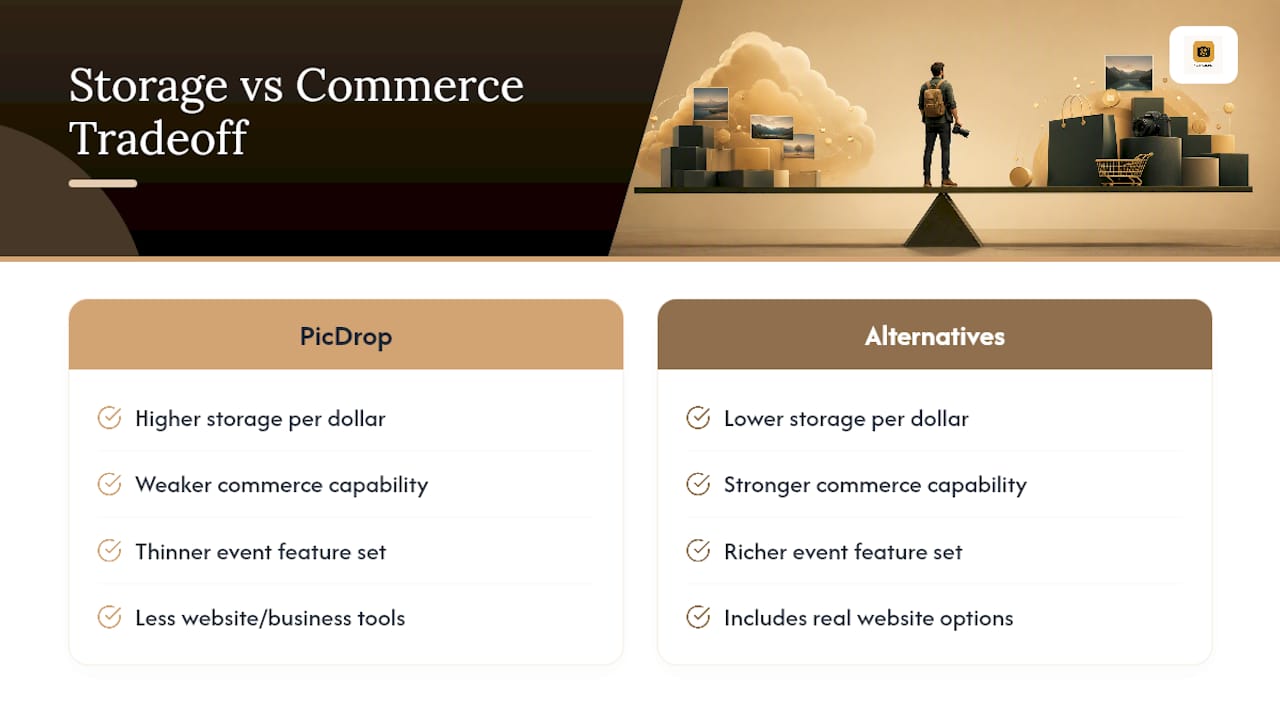
Storage is where the trade-off gets real. PicDrop’s plans often include generous storage at competitive price points, and most alternatives ask you to give some of that up in exchange for commerce tools, event features, or a real website. That’s not a flaw so much as a different bet: more storage per dollar, or more business built around your galleries.
Read this matrix by what you’re actually trying to do next, not by feature count. A photographer chasing print revenue should weight the commerce column heavily and accept a thinner event feature set. An event specialist should do the reverse. Pricing, storage limits, and commerce capability consistently show up as the three factors that decide which platform wins in practice, and vendors update plans often enough that you should confirm current numbers directly on each provider’s pricing page before committing.
What Makes Each PicDrop Alternative Different?
PhotoView.io: portfolio publishing with private delivery built in
One platform solves a problem the others treat as secondary: what happens to your galleries after the client has downloaded their files — including how to get found more easily with Photography SEO Services that boost your portfolio’s visibility. Most delivery tools are built to disappear once the transaction ends. This platform keeps working, because the same system that handles private client sharing also publishes work through responsive portfolio templates.
- Private sharing keeps client galleries secure and separate from public portfolios.
- Lightroom publishing pushes finished images straight from the catalog without a manual export and upload step.
- Live embeds mean a gallery updated in the dashboard updates everywhere it’s displayed, including on external sites.
- Mixed-media support lets photographers mix stills and video in one presentation.
The one real trade-off: this platform isn’t purpose-built for high-volume event guest delivery or automated print storefronts, so some photographers with large guest downloads or volume print sales might still lean on specialists for those functions.
Pro Tip: If you’re migrating off PicDrop, publish one finished gallery from Lightroom to a PhotoView portfolio template first. That single move shows you the delivery-to-presentation gap PicDrop never closed.
Pricing runs on storage-tiered subscriptions, with custom plans available for photographers with high-volume archives. You can review the portfolio comparison for a closer look at how templates and storage tiers line up.
Pixieset: the closest full-featured swap
Pixieset is the alternative most PicDrop refugees try first, and it’s easy to see why. It bundles galleries, an integrated store, and basic site-building into one login, which mirrors PicDrop’s simplicity while adding the commerce layer PicDrop skips. Client galleries support favoriting and comments, and the built-in store handles both prints and digital downloads.
The limitation: its site-building tools are functional rather than expressive. If your goal is a portfolio that reads as a considered body of work rather than a gallery wrapper, Pixieset gets you partway there.
Pro Tip: Use Pixieset’s store automation to test digital-download pricing before you commit to a full print fulfillment setup elsewhere.
Pic-Time: sales that keep running after you deliver
Pic-Time’s standout is automation. Once you deliver a gallery, Pic-Time can run scheduled campaigns, reminders, and gifting prompts without you touching the account again. That’s valuable for photographers who know clients buy more when nudged, but who don’t have time to manage that nudging manually. Photographers who need commerce built into their delivery workflow tend to value automation as much as the storefront fees themselves, and Pic-Time leans hard into that instinct.
The trade-off is that Pic-Time’s proofing tools are competent, not distinctive. If proofing UX is your top priority, this isn’t where Pic-Time separates itself.
ShootProof: keep your print margins
ShootProof offers no commission on print sales and includes professional lab fulfillment. For photographers whose business model depends on print revenue rather than digital downloads, that fee structure alone can outweigh feature gaps elsewhere on the platform. Proofing supports client favoriting and comments, and the print catalog runs through established lab partners rather than a generic print-on-demand backend.
The limitation is presentation. ShootProof’s site and portfolio tools exist, but they’re not where the platform’s design attention goes. It’s a sales and fulfillment tool first.
Pro Tip: Run a real order through ShootProof’s lab fulfillment during your trial period, not a test order. Shipping speed and print quality vary more between labs than most photographers expect.
CloudSpot: the low-cost entry point
CloudSpot targets solo photographers who need proofing plus basic business tools (contracts, invoicing) without paying for features they won’t use. Its free tier is a genuine starting point, not just a teaser, and its paid tiers stay priced for a single operator rather than a studio.
The limitation is depth. Storage runs thinner than the competition, and neither proofing nor commerce tools go as far as Pixieset’s or ShootProof’s. CloudSpot is a fine landing spot if budget is your primary constraint, less so if you expect to scale into print sales or high-volume event delivery.
FotoOwl: built for the guest count, not just the client
FotoOwl exists for a specific pain point: hundreds or thousands of event guests trying to find their own photos without emailing the photographer. Face recognition and WhatsApp delivery let guests self-serve, which matters because event photographers consistently prioritize guest self-service to cut down on manual sorting and support requests. Live upload during the event means guests can start browsing before you’ve even left the venue.
The trade-off is scope. FotoOwl is an event tool, not a portfolio or year-round business platform. It does one job extremely well and doesn’t pretend to do the rest.
Pro Tip: Turn on live upload for the first hour of any large event. Guests who find their photo early tend to keep checking back, which drives more engagement across the full gallery.
How Do You Choose the Right PicDrop Replacement?
Run this checklist before you commit to anything:
- Test proofing with a real gallery, not a demo set. Favoriting, commenting, and filtering all behave differently under an actual client’s indecision than they do in a sales demo.
- Time the delivery flow end to end. Upload a full shoot and time how long it takes a guest or client to receive a working link.
- Check original-file handling. Confirm whether raw files, full-resolution exports, and backups are retained or purged after a set window.
- Price out commerce fees honestly. A platform with a low subscription and a high commission can cost more per sale than one with a higher subscription and 0% commission.
- Confirm storage rules before you sign up, not after your first shoot fills the plan. Overage pricing surprises more photographers than any other line item.
Ask every vendor the same five questions during a trial: Can I export my client list and galleries if I leave? How are backups handled? What happens when I exceed my storage tier? Which labs fulfill print orders, and what’s the turnaround? Who owns the account if I add a second shooter or assistant?
Red flags worth walking away from: vague answers about data export, storage overage fees that aren’t published anywhere, and support that only responds through a ticket queue with no stated response time.
Pro Tip: Run a three-step trial before switching for real: upload one full shoot, deliver it to an actual client or a test guest, then simulate a sale or download flow through the platform’s commerce tools. If any one of those three steps feels clumsy, that’s the step that will frustrate you monthly, not just once.
If you want the option with the fewest recurring fees and don’t mind handling your own updates and security, self-hosted platforms offer unlimited storage without a subscription. That trade-off works only if you or someone on your team has the technical bandwidth to maintain it, since the maintenance burden is easy to underestimate going in.
How We Evaluated These PicDrop Alternatives
We weighed six platforms against PicDrop’s own strengths and gaps: feature coverage beyond simple delivery, proofing UX, commerce capability, event scalability, pricing against storage, and integration depth with tools photographers already use, especially Lightroom.
- Product documentation and pricing pages for each platform, checked for current tier structures.
- Comparison roundups covering the same competitive set, cross-referenced for consensus picks.
- Community discussion threads where photographers describe what they actually need after leaving PicDrop, including requests for voting, commenting, and filtering features.
We excluded a few community-flagged tools that either don’t serve the same market or duplicate a platform already on this list without a meaningful difference in capability. Pricing and storage terms shift often, so confirm current numbers directly with each vendor before you commit.
When PhotoView Makes Sense, and When It Doesn’t
One platform is the pragmatic choice for photographers who want their delivery workflow and public-facing portfolio to live in the same place. Consolidating onto one system with Lightroom publishing built in can simplify management versus using separate delivery tools, portfolio builders, and embed workarounds.
That said, specialists still earn their place. An event photographer processing thousands of guest downloads a weekend benefits from FotoOwl’s face search in a way no portfolio-first tool will match. Pick the tool that matches your actual revenue model, not the one with the longest feature list.
— Mitch Russo
Ready to Replace PicDrop With a Portfolio That Works Harder?
Some tools give what a delivery-only tool like PicDrop was never built to provide: a portfolio that stays current everywhere it’s seen, built from the same dashboard where private client galleries are managed. Instead of exporting from Lightroom, uploading to a delivery tool, then separately updating a website, publishing once can update galleries, embedded site sections, and portfolio templates together.

Start by publishing one gallery straight from Lightroom into a portfolio template, and see how it compares to your current PicDrop-plus-website setup. From there, check out the private photo sharing built for photographers page to see how client delivery works alongside your public presentation, or browse the photography website templates to find a layout that fits your style before you commit. Visit PhotoView’s solutions page to get started.
Sources
- picdrop Review: Versatile Image Sharing for Photographers
- picdrop Alternatives & Competitors - SaaSHub
- Best Picdrop Alternatives for Event Photographers 2026
- PicDrop Alternative: Why photographers often need more than an online gallery
FAQ
What’s the best free photo-sharing site for photographers?
CloudSpot’s free tier is the most usable no-cost option for photographers who need basic proofing and delivery without commerce or event features. Most other platforms on this list, including PhotoView, run on paid subscriptions once you need portfolio publishing or storage beyond a trial.
What’s the best photo organizing software for professionals?
For photographers who shoot in Lightroom and want organization to carry straight through to client-facing presentation, PhotoView’s Lightroom publishing keeps your catalog structure intact from edit to published gallery. For pure back-end organization without a publishing layer, a dedicated digital asset manager may suit your workflow better.
What’s the best free photo storage service for photographers?
Free storage tiers exist across most gallery platforms, but they cap out fast for working photographers. Self-hosted options like PicPeak offer unlimited storage without a subscription, provided you or your team can handle the ongoing security and update maintenance that comes with running your own server.
What’s the best photo app for free casual sharing?
For casual, one-off sharing with no client management needs, a free-tier consumer app is usually enough. Professional and event photographers outgrow that quickly once they need proofing, private galleries, or a portfolio that represents paid work.
Is PhotoView a direct replacement for PicDrop’s delivery features?
PhotoView handles private client delivery and pairs it with portfolio publishing and Lightroom integration, covering the presentation gap PicDrop leaves open. Photographers running high-volume event guest delivery or print-commission-sensitive sales may still want to pair it with a specialist tool for that specific function.