
Creators: Point Instagram Bio to a Hosted Portfolio With PhotoView
Use Instagram for discovery. Point your bio to a hosted, embeddable gallery and publish with PhotoView. Curate your feed and Highlights to drive clients.
Creators: Point Instagram Bio to a Hosted Portfolio With PhotoView
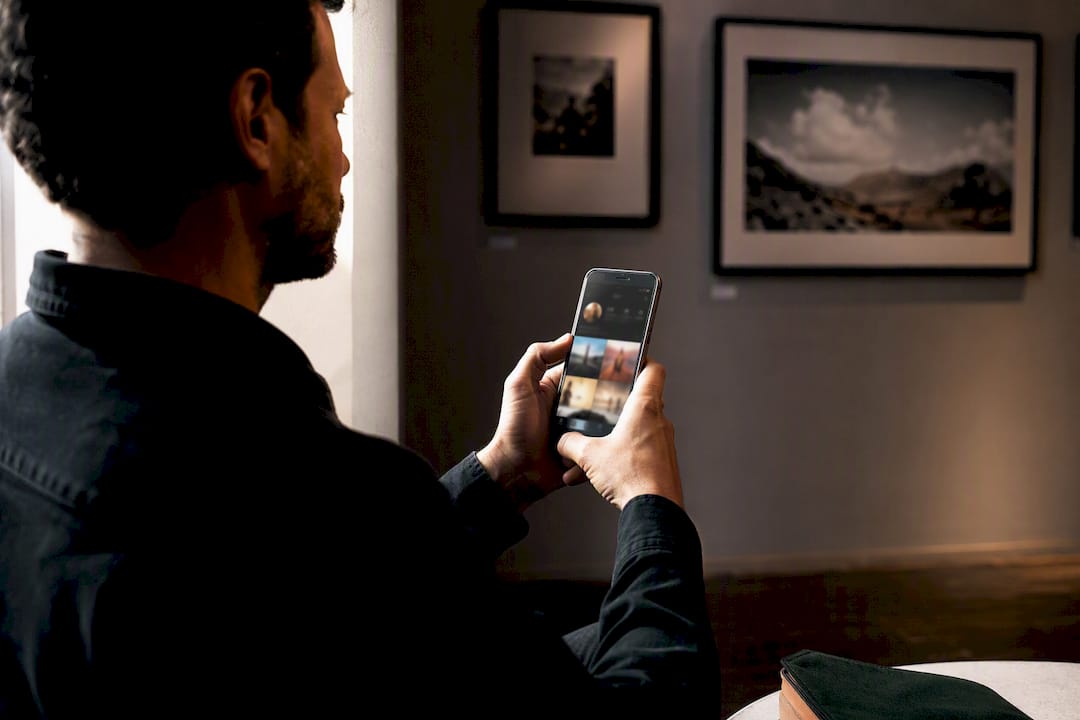
Yes, you can use Instagram as a professional portfolio, but only if you treat it as a curated display that funnels visitors toward an owned portfolio. The right setup is simple: a Creator or Business account, a feed and Highlights organized like a body of work, and a single bio link pointing to a hosted portfolio you control. Instagram builds discovery. Your portfolio closes the deal.
TL;DR:
- Using a Creator or Business account unlocks insights, contact options, and category tags necessary for a professional Instagram portfolio.
- A curated profile with a clear niche, a strategic bio, and pinned posts guiding visitors through identity, portfolio, and contact increases conversion rates.
- Carousel posts are most effective for showcasing multiple images in a portfolio, with singles reserved for standout moments and Reels for behind-the-scenes content.
- Highlights should serve as portfolio navigation, featuring core projects, pricing, process, testimonials, and FAQs, all linked with clear CTAs.
- An owned, regularly updated portfolio website remains essential to convert discovery into client trust, supplementing Instagram’s discovery role.
Table of Contents
- How Do You Get a Working Instagram Portfolio Live Fast?
- Which Account Type and Bio Setup Actually Convert?
- What Post Formats Show Off a Portfolio Best?
- How Do Highlights Turn Stories Into a Browsable Portfolio?
- What’s the Fastest Way to Turn Viewers Into Portfolio Visitors?
- What Export Settings Keep Your Images Sharp on Instagram?
- How Do You Attract Leads, Not Just Likes?
- Why Does an Owned Portfolio Still Matter?
- How Do You Keep Your Instagram Portfolio Visually Consistent?
- How Should You Read Instagram Analytics to Improve Your Portfolio?
- How Do You Turn Comments and Collaborations Into Client Leads?
- What Legal Issues Should You Watch When Posting Your Work?
- Can You Sell Directly From an Instagram Portfolio?
- An Author Perspective on Maintaining an Intentional Instagram Portfolio
- Where PhotoView Fits Into Your Instagram Funnel
- Sources
- FAQ
How Do You Get a Working Instagram Portfolio Live Fast?
Before you touch aesthetics or hashtags, get the structure right. This is the order that actually moves the needle:
- Switch to a Creator or Business account so you unlock insights, contact buttons, and category tags.
- Rewrite your bio with your specialization, a single call to action, and one portfolio link.
- Pin three posts that walk a visitor through identity, then portfolio, then contact.
- Build Highlights for your main portfolio categories, so new visitors can browse without scrolling.
- Set up a DM quick reply or keyword automation that sends your portfolio link the moment someone asks.
Do these five things and your profile stops looking like a scrapbook and starts working like a landing page.
Which Account Type and Bio Setup Actually Convert?
A Creator account gives you audience insights, branded content tools, and a simpler contact setup. A Business account gives you shopping tags, a contact button tied to your business category, and ad tools if you ever run paid promotion. Most working photographers and illustrators do fine with either. Pick Creator if you sell mainly your own creative work; pick Business if you plan to tag products or run ads.
Your bio needs to answer one question in five seconds: what do you shoot or make, and for whom? Something like “Editorial portraits for indie brands” beats “Photographer | Dreamer | Coffee addict” every time.
- State your niche and your deliverable in one line.
- Give visitors exactly one action: “Portfolio + bookings below.”
- Use a clean, well-lit profile photo, not a logo crop that disappears at thumbnail size.
- Let your three pinned posts do the introducing, so the bio doesn’t have to carry the whole pitch.
Pro Tip: Rewrite your bio every time you finish a signature project. A stale bio quietly tells visitors your work has stalled, even when it hasn’t.
What Post Formats Show Off a Portfolio Best?
Carousels are the workhorse of an Instagram portfolio because they let you tell a project’s story instead of flattening it into one image. A wedding gallery, a branding shoot, an illustration series in progress: all of it reads better across five to ten swipeable frames than as a single post, which is part of why carousels remain one of the most effective formats for creative work on Instagram.
Reserve single hero images for the moments that need to stand alone: a launch announcement, a career highlight, a shot representing your brand at its sharpest. Use Reels sparingly, for behind-the-scenes clips or process footage that builds credibility without competing with your still work.
Every caption should follow the same shape: context, result, and a low-friction next step.
- Context: what was the brief or the challenge.
- Result: what you delivered and why it worked.
- CTA: “Full gallery linked in bio” or “DM the word PORTFOLIO.”
If you want a content rhythm instead of guessing what to post next, adapt the familiar 5:3:1 ratio to portfolio goals: five portfolio pieces, three process or behind-the-scenes posts, and one educational or personal post per nine-post cycle. It keeps your feed varied without diluting the work itself.
How Do Highlights Turn Stories Into a Browsable Portfolio?
Highlights are the closest thing Instagram has to portfolio navigation, so treat each one like a page on a website rather than a leftover Story dump. Goldsmiths Centre’s guidance on presenting a portfolio through Instagram points to the same structure most working creatives land on eventually.
- Portfolio: your strongest three or four projects, one Story per project.
- Pricing: even a rough range removes a common friction point before someone DMs you.
- Process: how you work, what a client can expect, timelines.
- Testimonials: screenshots or quotes from past clients.
- FAQ: the five questions you answer most in DMs.
Inside each Highlight, keep the Story sequence short and end on a link sticker or a clear DM prompt. Your pinned posts should mirror this same three-step path: who you are, what you’ve made, how to reach you.
What’s the Fastest Way to Turn Viewers Into Portfolio Visitors?
A single canonical portfolio URL beats a stack of link-in-bio tools almost every time, because every extra tap between discovery and your gallery costs you conversions. Use an aggregator only if you’re actively running multiple campaigns that need separate landing spots; otherwise, point your bio straight at your gallery.
- Set your bio link to your best current portfolio page, not your homepage.
- If you must run a link-in-bio tool, limit it to three destinations max: portfolio, booking, contact.
- Build a DM keyword (“PORTFOLIO,” “BOOK,” “RATES”) tied to a quick reply that fires your link instantly.
- Swap the featured link whenever you launch a new project or campaign, and check click data monthly.
Pro Tip: Instagram’s own quick reply and automation tools remove the delay between a lead asking for your work and actually seeing it, which is often the exact window where interest fades.
What Export Settings Keep Your Images Sharp on Instagram?
Compression is the silent portfolio killer. Export in the sRGB color profile at 1080 pixels on the long edge for single posts, and stick to JPEG at 80 to 90 percent quality; anything higher just gets recompressed by Instagram anyway.
- Square (1:1) and portrait (4:5) both perform well for individual images; 4:5 gives you more vertical real estate for editorial or portrait work.
- Landscape (16:9) works for cinematic or environmental shots but shrinks fast in the feed, so use it sparingly.
- Upload a test post, zoom in on skin tones and shadow detail, and delete it if the compression banding is visible before you commit to a full carousel.
- Build a dedicated Lightroom export preset for Instagram sizing so every batch comes out consistent without manual resizing each time.
How Do You Attract Leads, Not Just Likes?
Vanity metrics feel good and mean almost nothing for booking work. Saves, profile visits, and DMs are the numbers that correlate with actual client interest, so weight your strategy toward those instead of chasing follower counts.
- Use a handful of specific niche and location hashtags rather than broad, oversaturated ones, and track which tags actually drive saves.
- Collaborate with complementary vendors, stylists, venues, or brands, so your work reaches an audience already primed to hire creatives like you.
- Label paid partnerships correctly using Instagram’s branded content tool; skipping this isn’t just risky, it undermines trust with the audience you’re trying to build.
- Review saves and shares weekly and let those numbers, not likes, tell you which projects to lean into next.
Strong visual content earns significantly more engagement than text-based posts, which is exactly why the format decisions above matter more than posting frequency ever will.
Why Does an Owned Portfolio Still Matter?
Instagram is a discovery engine. It is not a credibility engine, and most working photographers still need a website or hosted portfolio to close the loop that Instagram opens. A profile full of great work still asks a potential client to trust an algorithm-dependent feed with no proof of process, pricing, or professionalism beyond the grid.
The fix is straightforward: publish a gallery, embed it somewhere you control, and point your Instagram link at that exact page.
- Publish your curated body of work as a hosted gallery rather than relying on the Instagram grid as your archive.
- Embed that gallery directly on your existing website so visitors never have to leave your domain to see more.
- Keep the gallery updated automatically through Lightroom publishing instead of re-uploading images by hand every time you finish a shoot.
- Use private sharing for client proofing so portfolio visitors and paying clients never see the same view.
Websites convert clients more reliably than social feeds alone, largely because ownership and consistent presentation build a kind of trust a feed can’t replicate on its own.
How Do You Keep Your Instagram Portfolio Visually Consistent?
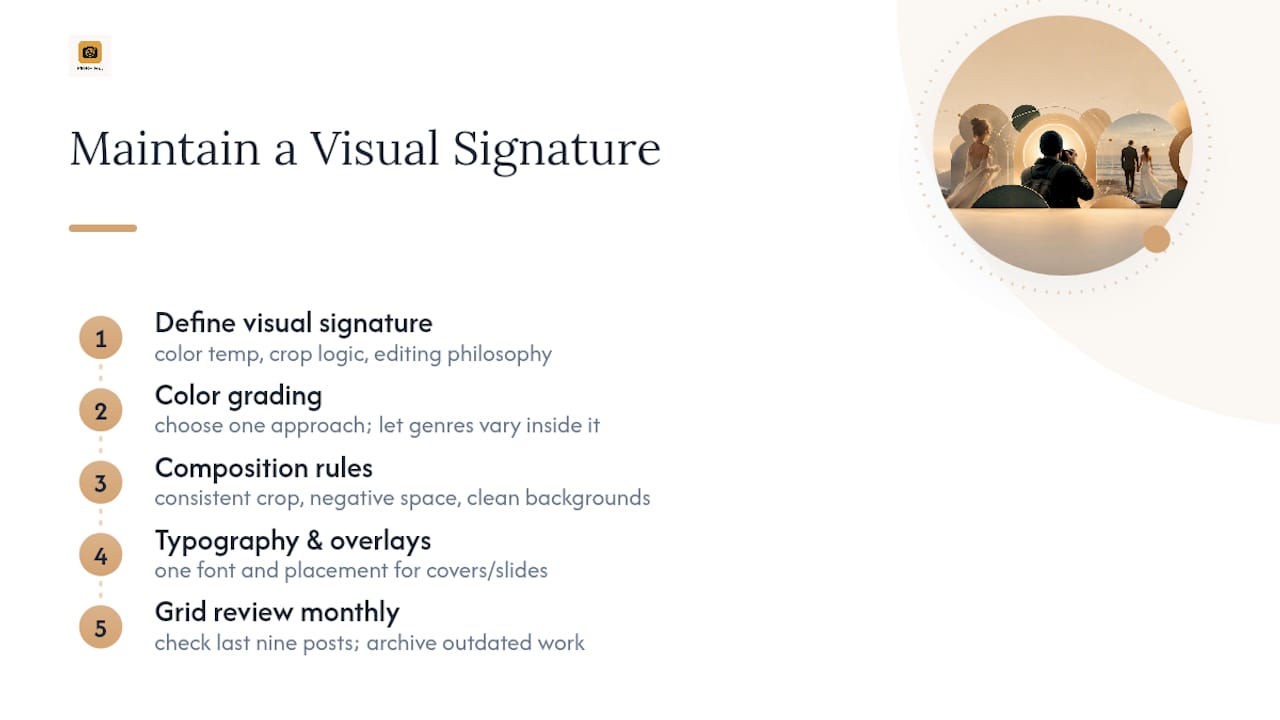
A portfolio that looks like ten different photographers took it will always underperform one with a clear visual signature. Consistency here doesn’t mean using the same filter on every photo. It means the same color temperature, the same crop logic, and the same editing philosophy showing up across projects, even different genres of work.
Start with your color grading. If you shoot warm, desaturated tones for weddings but punchy, high-contrast color for commercial work, your feed reads as scattered even if each individual post looks polished. Pick a grading approach and let genre variation happen within that consistent frame, not outside it.
Composition matters just as much as color. If your strongest work leans on negative space and clean backgrounds, don’t break that rhythm with a cluttered, busy shot just because it happened to get good light. Curate for coherence, not just quality.
Typography and overlay use should also stay consistent if you add text to Reels covers or carousel intro slides. Pick one font, one placement style, and reuse it every time, so returning visitors recognize your work before they even read the caption.
Finally, treat your grid as a sequence, not a random collection. Scroll your own profile monthly and ask whether the last nine posts tell a coherent story about your skill level and style right now. If a post no longer represents your current work, archive it. A portfolio should represent your best current output, not a historical record of everything you’ve ever shot.
How Should You Read Instagram Analytics to Improve Your Portfolio?
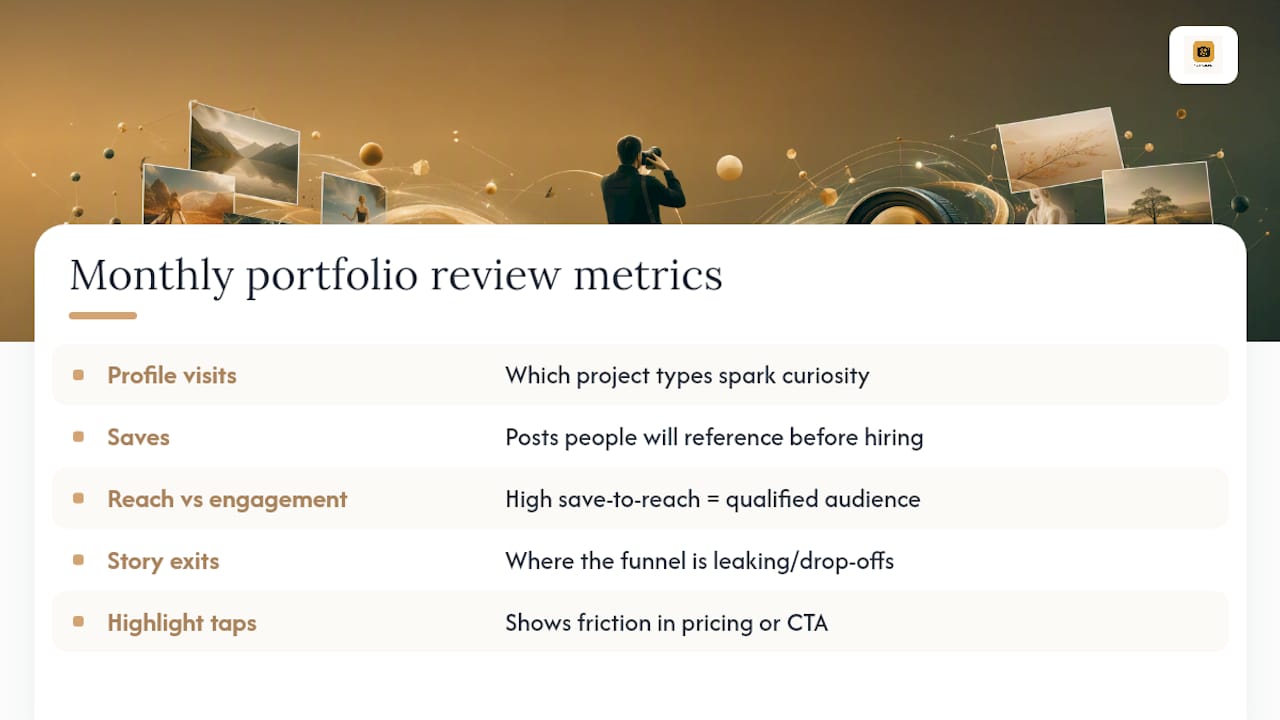
Instagram’s native insights, available once you switch to a Creator or Business account, give you more than vanity numbers if you know which metrics to actually watch.
Profile visits after a specific post tell you which project types make people curious enough to check your full body of work. If a carousel drives an unusually high spike in profile visits, that’s a signal to shoot more in that style, not just to post it again.
Saves matter more than likes for a portfolio account, because a save means someone wants to find that post again, often to reference it before hiring or to show a collaborator. Track which project types get saved most and lean into that direction for future shoots.
Reach versus engagement rate tells a different story than raw follower count. A post with modest reach but a high save-to-reach ratio often signals a smaller, more qualified audience, which matters more for booking work than a viral post full of casual scrollers.
Story exits and link taps on Highlights reveal where your funnel actually leaks. If your Pricing Highlight gets high views but low DM follow-through, the pricing information itself might be the friction point, not your work.
Check these numbers monthly, not daily. Daily checking invites reactive posting decisions based on noise; monthly reviews reveal actual patterns worth adjusting your strategy around.
How Do You Turn Comments and Collaborations Into Client Leads?
Every comment on a portfolio post is a small opening, and most creatives let it close unanswered. Respond to comments with something more substantial than an emoji, especially when the commenter asks a question about your process, pricing, or availability. That reply often becomes the first line of a client conversation happening in public, where other visitors can see it.
Collaboration posts, where you and another creative or vendor share credit on a single post, expose your work to an audience that already trusts the person you’re paired with. A stylist, a venue, a model, or a complementary illustrator all bring followers who are pre-qualified as people interested in creative services, which makes collaboration one of the higher-yield discovery tactics available to you.
When a potential client comments something vague like “beautiful work,” don’t let the exchange die there. A simple follow-up question, “Thank you! Are you working on a project I could help with?”, moves the conversation from passive admiration toward an actual inquiry without sounding pushy.
Engage proactively too, not just reactively. Spend ten minutes a few times a week commenting thoughtfully on work from complementary creatives, potential collaborators, or accounts in your target client’s orbit. This isn’t about follower farming. It’s about staying visible to the specific people most likely to need what you make.
What Legal Issues Should You Watch When Posting Your Work?
Copyright ownership of your images generally stays with you as the creator the moment you press the shutter or finish the illustration, but posting to Instagram doesn’t strip that ownership even though the platform gets a broad license to display what you upload. The risk usually isn’t Instagram itself. It’s other accounts reposting your work without credit or licensing it out without your permission.
Watermarking lightly, even just a small corner signature, makes casual re-use less appealing without ruining the visual impact of the shot. For commissioned work, especially weddings, portraits, or branded content, confirm in your contract whether you retain the right to post the final images publicly at all, since some corporate or personal clients require confidentiality.
If you feature identifiable people in your portfolio, especially for editorial, street, or documentary style work, a model release protects you if that image is ever used commercially later, even on your own portfolio site. Attribution matters in collaborations too: if a stylist, makeup artist, or designer contributed to a shoot, tag them and credit them in the caption. Beyond professional courtesy, uncredited collaboration work is one of the more common sources of creative disputes on the platform.
Never post client work before it’s been delivered or approved, particularly for weddings or events. This is both a professional norm and, depending on your contract language, occasionally a breach worth avoiding entirely.
Can You Sell Directly From an Instagram Portfolio?
Instagram Shopping and product tagging were built for retail, but photographers, illustrators, and designers selling prints, presets, or services can use the same tools with a little adaptation. If you sell physical prints or downloadable presets, Instagram Shopping lets you tag those specific products directly in portfolio posts, so a viewer admiring a landscape shot can tap straight through to buy a print of it.
For service-based creatives, product tags work less directly but still help; you can tag a “session booking” product listing that links to your scheduling page, turning an inspiring portfolio post into an immediate booking opportunity instead of a dead end. Sticker tags on Stories, particularly the product sticker, work well inside your Highlights when you want a Pricing or Booking Highlight to end on a direct action instead of just information.
The key is restraint. Tag sparingly and only on posts where the commercial intent genuinely fits the image, since a feed that feels like a storefront on every post undercuts the portfolio credibility you’re trying to build in the first place. Reserve tagging for a select few flagship posts and let the rest of your feed do the work of demonstrating skill, not selling directly.
An Author Perspective on Maintaining an Intentional Instagram Portfolio
The creatives who scale inquiries fastest post less, not more. A tight rhythm, one strong carousel a week, cut booking time in half for photographers I’ve watched build this way, because a curated feed builds trust quicker than a noisy one.
— Mitch Russo
Where PhotoView Fits Into Your Instagram Funnel
Instagram gets people curious. PhotoView is the alternative to rebuilding your gallery workflow from scratch every time a client asks to see your full body of work. Instead of manually re-uploading edits, you publish directly from Lightroom, and your hosted gallery updates automatically, so the link in your Instagram bio always points to your current best work instead of a stale export from six months ago.

That gallery can also embed directly on your existing website, so visitors coming from Instagram land on a professional, mobile-ready experience rather than bouncing between platforms. Private sharing lets you send client proofs through a separate, unlisted link without mixing them into your public portfolio, and multiple galleries let you organize by category the same way you’ve organized your Highlights. If your Instagram funnel currently ends on a generic link-in-bio page, start with PhotoView’s portfolio publishing solutions and give that link somewhere worth landing.
Sources
- How to set up a creator portfolio on Meta Creator Marketplace
- It starts here: How to present your portfolio through Instagram
- How professional photographers build online portfolios in 2026
- Instagram marketing for photographers: 2026 growth playbook | Gainsty
FAQ
Can I post my portfolio on Instagram?
Yes. Instagram works well as a portfolio when you switch to a Creator or Business account, curate your feed by project, and organize Highlights around the questions clients actually ask.
What is the 5-3-1 rule for Instagram?
It’s a content mix guideline suggesting five portfolio or value posts, three process or behind-the-scenes posts, and one personal or educational post per posting cycle, adapted here to keep a portfolio feed varied without diluting the work.
What is the new sharing feature on Instagram?
Instagram’s Creator Marketplace includes a creator portfolio tool that lets creators showcase past work and audience insights directly to brands seeking collaborations.
How do I connect my Instagram account to a page in my business portfolio?
Switch to a Business or Creator account in settings, then link your Facebook Page or business portfolio through Meta Business Suite, which unlocks shared insights and contact tools across both platforms.
Do I still need a website if I have a strong Instagram portfolio?
Most working creatives do. An owned portfolio, like one built on PhotoView, gives you credibility, search visibility, and full control that a social feed alone can’t offer.