
Switch to PhotoView: SmugMug Alternatives for Lightroom Photographers
Compare SmugMug alternatives and why PhotoView replaces SmugMug for Lightroom first photographers, publishing directly from Lightroom and adding private...

Switch to PhotoView: SmugMug Alternatives for Lightroom Photographers
If you want one answer: PhotoView is the strongest SmugMug alternative for photographers who need Lightroom publishing, private client galleries, and portfolio-first templates in one dashboard. If your priority is fast wedding delivery, look at Aftershoot Galleries. If you want polished proofing for print sales, Pixieset or Pic-Time cover that lane well. A comparison table and platform-by-platform notes follow so you can match the right tool to your actual workflow.
TL;DR:
- PhotoView is ideal for photographers who want Lightroom publishing integrated with private client sharing and portfolio presentation in one dashboard.
- Most platforms require real-world testing of file handling, pricing, and upload speeds through a single job before committing, as specs often hide hidden costs or limitations.
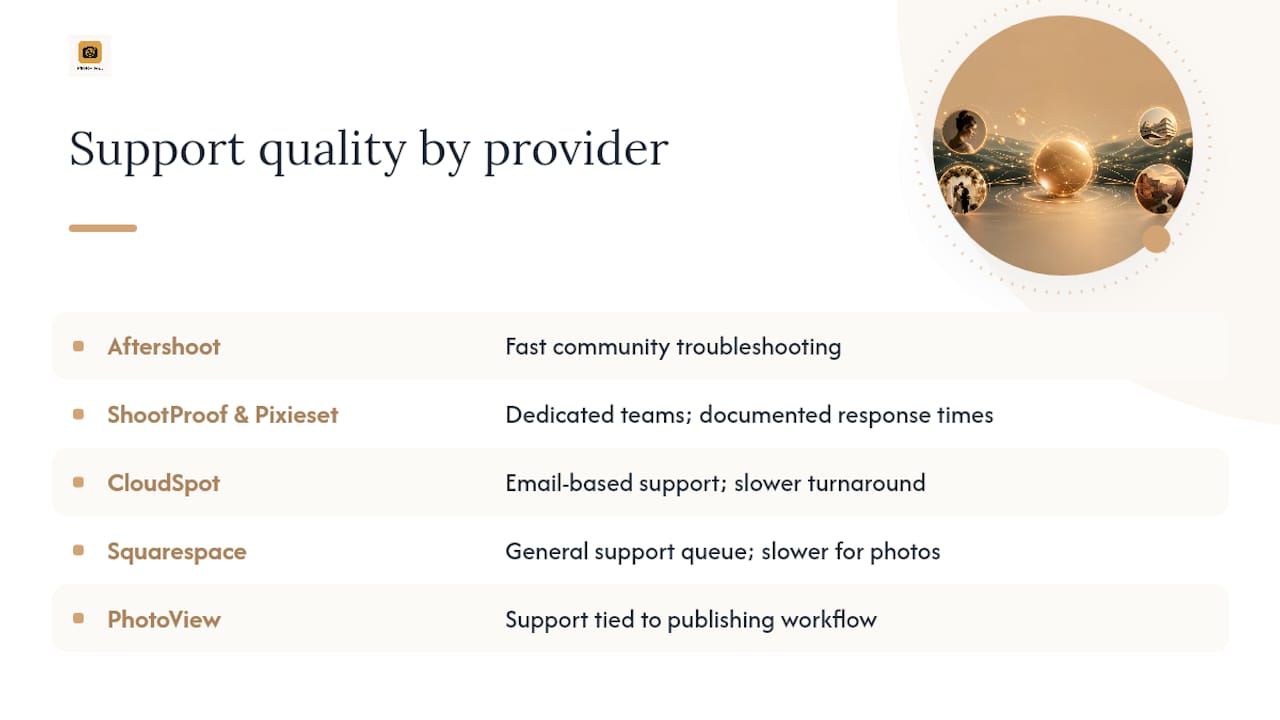
- Support quality varies widely, with ShootProof and Pixieset offering dedicated teams for urgent live shoot issues, while budget options like CloudSpot tend to have slower response times.
- Mobile app performance and gallery responsiveness on phones are critical; PhotoView and Pixieset excel in mobile viewing, especially for client engagement.
- Security features differ, with PhotoView offering seamless private sharing and custom domain options, but all platforms should be tested for functional privacy controls and download restrictions before use.
PhotoViewPresent Your Work More EasilyPhotoView brings Lightroom publishing, private sharing, and portfolio presentation together in one dashboard for photographers.Explore PhotoView
Table of Contents
- What Are the Best SmugMug Alternatives Right Now?
- How Do the Top SmugMug Alternatives Compare?
- Platform Profiles: What Each One Actually Does
- How Should You Choose Between These Platforms?
- How Does PhotoView Solve the Same Problem SmugMug Does?
- Which Alternatives Offer the Best Customer Support?
- Do These Platforms Have Good Mobile Apps?
- How Do Security and Privacy Compare to SmugMug?
- How Customizable Are Gallery Designs Across Platforms?
- What Community or Social Sharing Features Do These Platforms Offer?
- What Should You Actually Weigh When You Switch From SmugMug?
- Start Your PhotoView Trial Today
- Sources
- FAQ
What Are the Best SmugMug Alternatives Right Now?
You don’t need to test sixteen platforms to find your fit. Most photographers land on one of three needs, and each has a clear answer.
- PhotoView fits you if you shoot in Lightroom and want your finished images to publish straight to a branded portfolio, with private sharing controls for client delivery baked in rather than bolted on.
- Aftershoot Galleries fits you if you’re a high-volume wedding or event shooter already using Aftershoot’s culling tools. Delivery becomes part of the same edit pipeline, with face-scan sorting and a built-in print store attached to the workflow you already run.
- Pixieset or Pic-Time fit you if client-facing polish and print revenue matter more than back-end publishing. Both platforms lean into gallery design and proofing, which shows in how photographers describe the client experience on PetaPixel’s roundup of photo-sharing sites.
Here’s the practical move: don’t pick from a feature list alone. Run one real job, start to finish, through your top two finalists before you commit. Most platforms offer a free trial or free tier, and a single wedding or portrait session will expose pricing surprises, upload speed problems, or missing RAW support faster than any spec sheet will.
How Do the Top SmugMug Alternatives Compare?
Photographers switching platforms tend to care about the same seven things: who the platform is built for, what the entry plan costs, how storage is measured, whether print sales are built in, whether Lightroom fits into the workflow, how video and RAW files are handled, and what controls exist around private client galleries.
Pro Tip: Pricing and storage caps change often across this category, so confirm current numbers on each vendor’s site before you commit. RAW and video handling in particular varies by plan tier, not just by platform.
SmugMug itself remains known for unlimited full-resolution storage and built-in print sales, but PCMag’s testing notes that RAW support and advanced video handling often require paid add-ons there, which is exactly the gap many of the platforms above were built to close.
Platform Profiles: What Each One Actually Does
PhotoView publishes directly from Lightroom into a branded portfolio, with Smart Folders and private sharing controls for client delivery. It fits photographers who want one dashboard for public portfolio and private client work. The trade-off: it’s built around presentation and delivery rather than in-person print sales, so studios that live on point-of-sale printing should weigh that against their revenue model.
- Aftershoot Galleries ties gallery delivery directly to Aftershoot’s culling and face-scan tools, which suits shooters already inside that ecosystem. Outside that ecosystem, the value proposition thins out considerably.
- Pixieset delivers clean, mobile-first galleries with solid print fulfillment. Its Lightroom workflow options are limited compared to publishing-first platforms.
- Pixpa bundles a website builder with galleries and a store, which works if you want one product for everything. Design flexibility trails dedicated portfolio platforms.
- Pic-Time leans hard into album proofing and premium templates, a strong fit for photographers who sell albums. It’s less suited to photographers who don’t sell physical products.
- ShootProof keeps a consistent feature set across its pricing tiers and leans into in-person sales tools. It’s less differentiated on design than newer, template-driven competitors.
- Zenfolio offers a full website and commerce layer, often priced below comparable all-in-one tools according to Zenfolio’s own comparison page. Its template variety is narrower than dedicated portfolio builders.
- PhotoShelter is built for archive search and licensing metadata, not portfolio polish. Photographers who don’t manage large stock libraries will find it overbuilt for their needs.
- Picflow keeps things simple with design-forward, minimal galleries, as noted in Picflow’s own roundup of alternatives. It lacks the commerce depth of ShootProof or Pixieset.
- CloudSpot bundles basic studio manager features like contracts and invoicing at a low entry price, which suits solo photographers on tight budgets. Its design options are more limited than premium competitors.
- Squarespace gives you full control over your public site and SEO, but you’re managing a general website builder, not a photography-specific gallery tool.
- Flickr still offers meaningful community exposure and simple hosting, though many working photographers use it for visibility rather than client delivery, a distinction worth keeping in mind given ongoing user complaints about platform direction across legacy photo-sharing sites generally.
A few names round out the wider field: Lightfolio, SlickPic, Format, and Photobucket all show up in broader alternative-photo-storage searches, typically as lighter-weight or more budget-oriented options with fewer workflow integrations than the platforms above. They’re worth a look if your needs are simple hosting rather than client delivery or Lightroom publishing.
Before you commit to any platform, check what migration actually involves. Most gallery platforms support bulk uploads from a local folder or cloud drive, but moving years of SmugMug albums with existing folder structures and client links intact takes real time. Ask each finalist directly how they handle bulk import and whether gallery URLs or client passwords carry over.
How Should You Choose Between These Platforms?
Work through this checklist during any trial or demo, in this order:
- Storage model. Is pricing based on gigabytes, unlimited photos at a resolution cap, or photo count? This determines your long-term cost as your archive grows.
- Large-file handling. Upload a real RAW file and a 4K video clip. Time it. Some platforms choke on files most working photographers consider routine.
- Lightroom and export workflow. If you cull and edit in Lightroom, ask whether publishing is direct or requires a manual export-and-upload step every time.
- Commerce and print integration. If you sell prints, confirm which lab the platform uses and what percentage it takes per sale; understanding how gallery platforms affect bookings through SEO can also influence your decision.
- Pricing transparency. Ask for the full pricing page, not just the entry tier. Storage overages and transaction fees are where surprises live.
- Security and private sharing. Confirm password protection, expiring links, and download permission controls exist and actually work as described.
Ask each vendor these eight questions directly: What happens if I exceed my storage tier? Can I set expiring links for client galleries? Does video playback work at full resolution on mobile? What’s your RAW file size limit? Which print labs do you integrate with, and what’s the commission? Can clients download originals, or only compressed previews? Is there a transfer tool for existing SmugMug content? What’s your support response time during a live event weekend?
Pro Tip: Upload one full-resolution RAW file and one video clip during any trial, not just JPEGs. That single test exposes more real limitations than a week of reading feature pages.
Red flags to walk away from: vague or hidden fees, no RAW or video support at any tier, no way to restrict downloads on client galleries, and support that’s unreachable on weekends, which is exactly when wedding and event photographers need it most.
How Does PhotoView Solve the Same Problem SmugMug Does?
PhotoView’s core claim is straightforward: publish finished work directly from Lightroom, curate it into a mixed-media portfolio, and control exactly who sees it, all from one dashboard. Smart Folders keep your Lightroom catalog synced to your live site without manual re-uploads every time you finish an edit. Private sharing settings let you send a client-only gallery link without exposing the same work publicly on your portfolio.
Two practical scenarios show this in action. A wedding photographer can deliver a private client gallery for proofing while simultaneously publishing curated highlights to a public portfolio, no duplicate uploads required. A photographer building a video-inclusive portfolio can mix stills and motion work in the same gallery rather than routing video through a separate host.
Pro Tip: Run one identical job, photos and video both, through PhotoView and your other finalist. The gap in upload time and gallery setup usually becomes obvious within the first hour.
Which Alternatives Offer the Best Customer Support?
Support quality varies more across this category than most feature lists suggest. Aftershoot Galleries benefits from an active user community built around its editing software, so troubleshooting often happens fast through existing channels rather than a formal ticket queue. ShootProof and Pixieset both maintain dedicated support teams with documented response times, which matters most during live shoot weekends when a broken gallery link becomes an emergency, not an inconvenience.
CloudSpot’s budget positioning means support tends to be lighter, typically email-based with slower turnaround, a reasonable trade-off for photographers who mainly need occasional help rather than real-time troubleshooting. Squarespace, as a general website builder rather than a photography-specific tool, routes photography questions through the same broad support queue as every other Squarespace customer, so specialized gallery issues can take longer to resolve.
Flickr’s support has thinned out considerably as the platform has shifted focus over the years, a point that shows up repeatedly in user complaints about the platform more broadly across legacy photo-hosting services. PhotoView keeps support tied directly to the publishing workflow, since most support requests in this category involve either an upload issue or a template question, both of which benefit from a team that built the templates in question.
Before switching, test support directly during your trial. Send one real question and time the response. That single interaction tells you more than any support page’s stated hours ever will.
Do These Platforms Have Good Mobile Apps?
Mobile matters more than most photographers expect until they’re editing client feedback from a phone between shoots. Pixieset’s mobile experience is polished on the client side, letting buyers browse and favorite images smoothly, which directly supports its print-sales model. Pic-Time follows a similar pattern, prioritizing the client-facing mobile experience since proofing and album selection often happen on a phone or tablet rather than a desktop.
ShootProof and Zenfolio both offer functional mobile access, though the emphasis leans toward client viewing rather than photographer-side management. CloudSpot’s mobile experience covers the basics without extensive extra functionality, in line with its budget positioning. Flickr’s app remains solid for browsing and light editing, reflecting its roots as a photo community rather than a client-delivery tool.
PhotoView’s mobile-optimized gallery templates mean portfolios and private client galleries render properly on a phone without a separate app requirement, since the templates themselves are built responsive from the start rather than retrofitted. That distinction matters if your clients primarily view galleries on their phones, which most do.
The practical test: pull up a gallery on your own phone during any trial, on both WiFi and cellular data. Slow-loading mobile galleries lose client engagement fast, and this is one of the easiest things to verify before you sign up for a year of service.
How Do Security and Privacy Compare to SmugMug?
Private sharing controls separate professional gallery platforms from general photo hosting. SmugMug offers password protection and privacy settings, but photographers report wanting more granular control over download permissions and link expiration, one reason workflow-first alternatives have gained traction among photographers frustrated with rigid privacy defaults.
Pixieset, ShootProof, and Pic-Time all offer password-protected galleries with varying levels of download control, letting you restrict clients to viewing only or allow specific download permissions. PhotoShelter goes further on access control since its core audience, licensing clients and archive managers, needs precise permission tiers rather than simple password gates.
PhotoView builds private sharing and custom domain options directly into its publishing workflow, so a client gallery can sit behind a password while your public portfolio stays open, without needing a separate tool or workaround. Flickr and Squarespace both offer basic privacy toggles, but neither was built specifically around the private-client-delivery model that wedding and commercial photographers rely on daily.
Whatever platform you choose, test the actual client experience yourself: generate a private link, open it in an incognito browser window, and confirm download permissions behave exactly as configured. Privacy settings that look correct in a dashboard sometimes behave differently on the client-facing side.
How Customizable Are Gallery Designs Across Platforms?
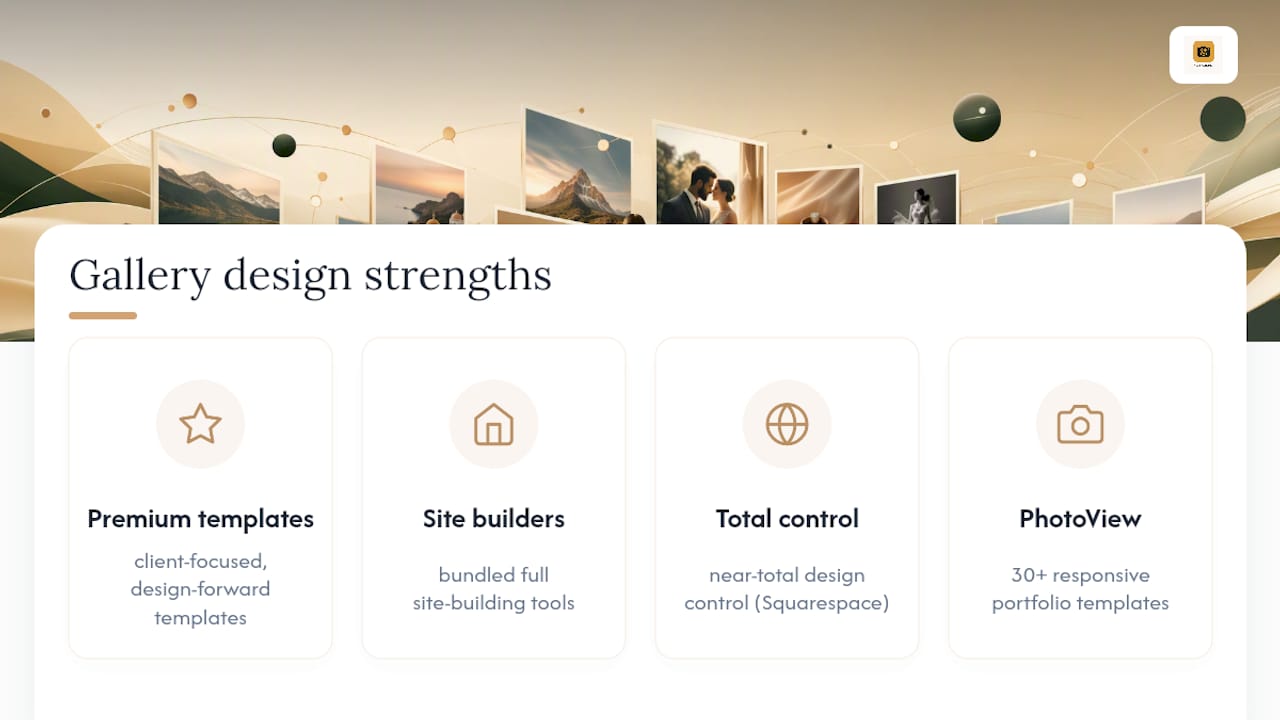
Template variety and design flexibility separate platforms more than most comparison charts show. Pic-Time and Pixieset both lean into premium, design-forward templates built around client presentation, a strength that PetaPixel highlights as central to why wedding and portrait photographers gravitate toward them. Pixpa and Zenfolio offer broader website customization since both bundle full site-building tools alongside galleries.
Squarespace sits at the far end of customization since it’s a general-purpose website builder, giving you near-total design control at the cost of photography-specific gallery features you’d get natively elsewhere. ShootProof and CloudSpot offer functional but less design-forward templates, prioritizing sales tools and studio management over visual variety.
PhotoView offers more than 30 responsive portfolio templates alongside custom domain support, built specifically around presenting mixed-media work, stills and video together, rather than treating video as an afterthought. That range matters if you shoot across multiple genres and need your site to shift tone between, say, a wedding gallery and a fine art series without looking like two different businesses.
The real test isn’t how many templates a platform lists. It’s whether you can find one that fits your actual work within twenty minutes of signing up. If you’re still hunting for a template that doesn’t fight your images after half an hour, that’s a signal worth taking seriously.
What Community or Social Sharing Features Do These Platforms Offer?
Flickr remains the clearest example of a platform built around community visibility rather than private client delivery. Photographers use it for discovery, feedback from other photographers, and public archive hosting, though its role has shrunk as dedicated client-gallery platforms have taken over the commercial side of the business.
Most of the platforms in this comparison, Pixieset, ShootProof, Pic-Time, CloudSpot, treat social sharing as a secondary feature at best, since their core audience wants private client delivery rather than public community exposure. Squarespace supports social sharing through standard website tools, but it’s not built around photography community specifically.
PhotoView includes automated social campaign tools that keep your public portfolio and social presence connected without manual reposting every time you publish new work. That’s a different kind of “social” than Flickr’s community model, less about peer feedback, more about getting finished work in front of the audience that already follows you. If community feedback and public discovery matter more to you than client delivery, Flickr still fills that specific role better than any workflow-first platform will.
What Should You Actually Weigh When You Switch From SmugMug?
The real trade-off isn’t features. It’s what you’re optimizing for. SmugMug’s unlimited archival storage has genuine value if you’re sitting on fifteen years of full-resolution files you never want to touch again. But most working photographers aren’t archiving. They’re delivering, publishing, and moving to the next job, and that’s where workflow-first platforms save real hours every week.
My advice: don’t switch on faith. Run one real job, start to finish, through two finalists before you commit to either. Confirm lab integration terms and transaction fees in writing, not just marketing copy, before you migrate a single client gallery.
— Mitch Russo
Start Your PhotoView Trial Today
PhotoView is a substitute platform for photographers seeking presentation strengths similar to SmugMug without giving up Lightroom-based delivery. Where SmugMug asks you to manage uploads and public/private settings separately, PhotoView keeps Lightroom publishing, private client sharing, and mixed-media portfolios in one dashboard, so a finished edit gets from your catalog to a client’s inbox without a manual export step in between.

If you shoot weddings, travel, fine art, or commercial work and want your public portfolio and private client delivery running from the same system, start a trial and run one real job through it. Compare it directly against your current setup using PhotoView’s own comparison page, or head straight to the solutions page to see current plans and pick the storage tier that matches your archive size.
Sources
- The Best Online Photo Storage Services We’ve Tested for 2026 | PCMag
- SmugMug Alternative: 7 Better Options for 2026 | Fastio
FAQ
Which Is Better, SmugMug or Zenfolio?
SmugMug still leads on unlimited full-resolution storage, so the better choice depends on whether pricing or archival capacity matters more to you.
Why Are People Leaving Flickr?
User reviews point to a shrinking focus on professional features and support as Flickr has shifted toward a more general photo-community model over the years. Photographers who need private client delivery or commerce tools have largely migrated to gallery-specific platforms instead.
Which Is Better, Pixieset or SmugMug?
Pixieset generally wins on gallery design polish and print-sales workflow for wedding and portrait photographers. SmugMug still offers more storage flexibility and a longer track record for photographers who prioritize archival capacity over presentation.
Which Is Better, Flickr or SmugMug?
Flickr suits photographers who want community exposure and simple public hosting, while SmugMug is built for private client delivery and print sales. They serve different jobs, so the “better” platform depends on whether you need a public audience or a private client workflow.
Is PhotoView a Good SmugMug Alternative for Lightroom Users?
Yes. PhotoView publishes directly from Lightroom into a branded portfolio and supports private client sharing in the same dashboard, which SmugMug does not offer as a native workflow integration.