
Avoid Plugin Headaches: 5 WordPress Alternatives for Photographers
Compare five platform categories photographers can use instead of WordPress. Learn how to pick by workflow, protect SEO during migration, and why...

Avoid Plugin Headaches: 5 WordPress Alternatives for Photographers
For most photographers, the fastest path off WordPress is a portfolio-first platform like PhotoView that bundles galleries, proofing, and fast image delivery into one dashboard. You skip the plugin stack and get client workflows built in from day one, plus quicker load times on mobile. WordPress still wins if you need heavy customization or a complex online store, but that’s a small slice of working photographers.
TL;DR:
- Moving to a photography-first platform like PhotoView offers faster load times, built-in proofing, and seamless Lightroom integration, reducing setup complexity.
- Platform choice should be driven by whether your main pain point is client proofing, visual design, or sales, not by features alone.
- A simple gallery and homepage migration can take a few hours to a weekend, while a full-site rebuild with content and redirects may last several weeks.
- Choosing the wrong platform category (template builder vs. photography-focused) can cause costly rebuilding within a year.
- PhotoView provides automatic gallery updates, private client sharing, and performance-optimized delivery, ideal for photographers prioritizing client workflow.
PhotoViewPresent Your Work Without Plugin HasslesPhotoView brings galleries, portfolios, presentations, and website embeds together, helping photographers manage their work from one dashboard.Explore PhotoView
Table of Contents
- What Are the Best WordPress Alternatives for Photographers?
- How Do You Choose the Right Platform for Your Workflow?
- How Long Does Migrating Off WordPress Actually Take?
- Is It Worth Leaving WordPress, or Just Fixing It?
- Where PhotoView Fits If You’re Ready to Switch
- Sources
- FAQ
What Are the Best WordPress Alternatives for Photographers?
WordPress alternatives for photographers fall into five categories, and picking the wrong one is the single most common reason photographers end up rebuilding a site within a year. Each category solves a different problem. Knowing which problem you actually have saves you months.
Template-led visual builders give you strong design control and a fast setup. They’re built for photographers who prioritize how a page looks over what happens after a client clicks a gallery link. If your main complaint about WordPress is that every theme looks the same, this category fixes that fast. The tradeoff: native proofing and client delivery tools are usually thin or absent, so you’re back to bolting on a separate service.
Photography-first platforms flip that priority. They’re built around galleries, proofing, and delivery, with design templates as the second layer rather than the first. Wedding and commercial photographers who deliver hundreds or thousands of images per shoot gravitate here because the platform already knows what a “select” is and how a client should mark favorites. Practitioner guidance on image handling notes that platforms architected for photography handle thumbnail generation and delivery speed automatically, while generic content management systems need extra configuration to match that performance.
Hosted publishing and CMS platforms serve a different job entirely: editorial content, memberships, and newsletters. Ghost positions itself as a publishing-focused WordPress alternative, with built-in tools for turning readers into paying subscribers. If you write long-form essays about your process or run a members-only archive, this category matters more than gallery depth. If a client gallery is your actual bottleneck, it won’t help you.
Ecommerce-first platforms matter when print or product sales are the primary revenue line, not a side feature. These platforms treat checkout, shipping, and inventory as the core product, with portfolio display as a secondary concern.
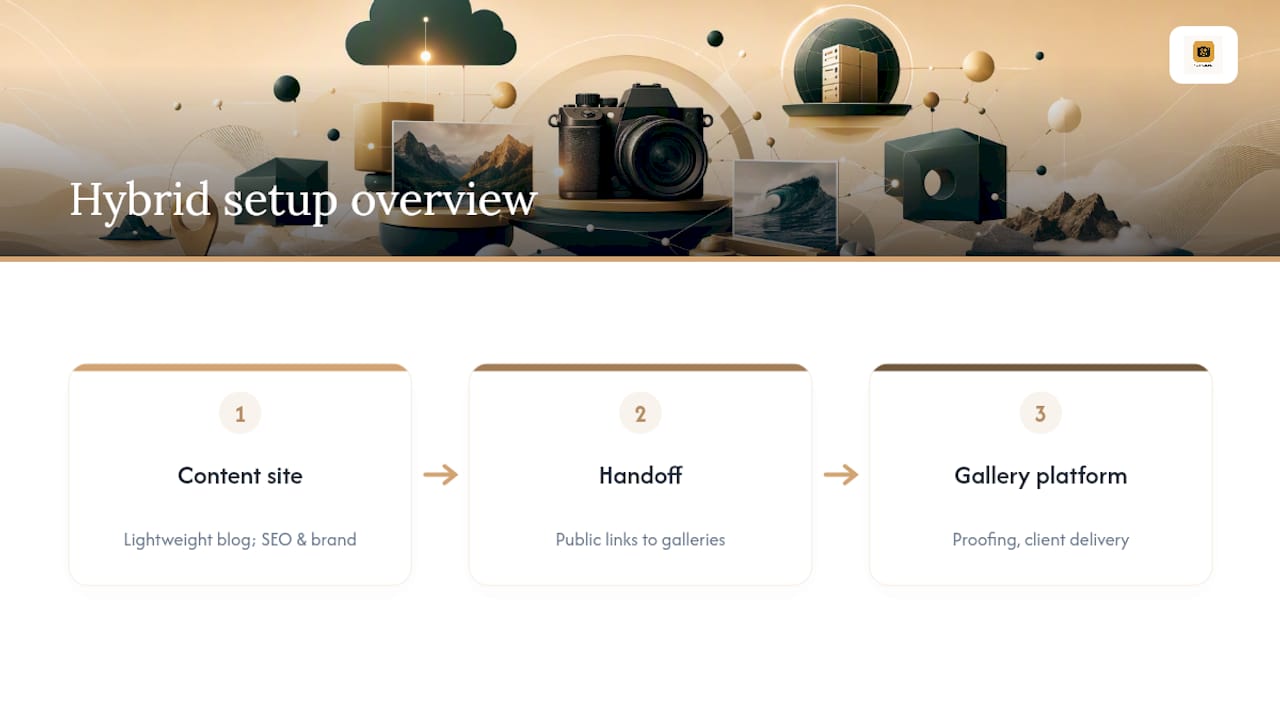
Hybrid setups combine a content site with a dedicated presentation tool. Some photographers keep a lightweight blog or brand site for SEO and link out to a separate gallery platform for delivery and proofing. It’s more moving parts, but it lets each tool do the one job it’s actually good at.
One more category worth naming honestly: AI-assisted site builders like Framer can spin up a decent-looking layout in minutes. Analysis from Zapier points out that these tools accelerate the initial build but rarely produce a photographer-ready proofing workflow without manual work layered on top.
How Do You Choose the Right Platform for Your Workflow?
Start by naming your single biggest pain point before you compare a single feature. Zapier’s guidance on WordPress alternatives is blunt about this: visual builders solve design problems, and photography-specific platforms solve client workflow and proofing problems. Trying to fix a proofing headache with a prettier theme wastes your trial period.
Once you know your priority, run through this order:
- Rank your top need: client delivery, visual presentation, or sales.
- Check image delivery: does the platform use a CDN, generate thumbnails automatically, and serve responsive galleries?
- Test the client workflow: private galleries, proofing with selects and annotations, and links that expire on schedule.
- Confirm the integrations you use daily, especially Lightroom publishing, print lab connections, and booking or payment tools.
- Understand the pricing shape: storage-based tiers behave very differently from feature-gated tiers with transaction fees on print sales.
Before you commit, run every serious candidate through an eight-item trial checklist during its free plan or demo: upload speed for a full shoot, gallery privacy controls, mobile preview quality, embed behavior on an existing site, basic SEO settings, export options for originals, print-ready export sizing, and how fast support actually responds when you ask a real question.
Pro Tip: Upload one full wedding gallery, not five sample photos, during your trial. Platforms that feel fast with ten images sometimes stall badly at three hundred, and you won’t find that out until it’s too late.
How Long Does Migrating Off WordPress Actually Take?
A portfolio-only switch, moving galleries and a homepage without rebuilding a full site, typically takes a few hours to a weekend. A full rebuild with blog content, custom pages, and SEO redirects runs longer, often several weeks depending on how much content you’re carrying over.
Budget for these cost buckets:
- The new platform’s subscription, which is usually the only recurring cost if you’re not rebuilding from scratch.
- Domain transfer or DNS changes, which are typically free or low-cost through your registrar.
- Optional developer time or content cleanup if your WordPress site has years of accumulated pages.
- Integration fees for print labs or booking tools that charge separately from your gallery platform.
Protect your image quality and your SEO while you move. Migration guidance recommends exporting original files rather than resized web versions so print quality survives the jump, and preserving alt text and captions so accessibility and search visibility don’t reset to zero. Set 301 redirects on your highest-traffic pages before you flip the switch, not after. The pitfalls that actually hurt photographers: losing a client-shared gallery link mid-project, stripping IPTC metadata during export, and ending up with inconsistent image sizing that slows pages down and looks sloppy on mobile.
Is It Worth Leaving WordPress, or Just Fixing It?
Here’s the honest tradeoff: WordPress gives you more control than any alternative on this list, full stop. If you’re running a complex ecommerce operation with custom checkout logic, or managing several linked sites with different workflows, that control is worth the maintenance tax. Most photographers aren’t in that position.
What tips the scale for most working photographers is time, not features. Practitioners consistently report that specialized platforms cut technical debt and speed up client delivery compared to running WordPress with a stack of gallery and proofing plugins. Every hour you spend debugging a plugin conflict is an hour you didn’t spend shooting or editing. Choose based on what you actually want more of this year: control over your stack, or time behind the camera.
— Mitch Russo
Where PhotoView Fits If You’re Ready to Switch
PhotoView is built around exactly the priorities photographers name most often when they leave WordPress behind: galleries that load fast, client workflows that don’t need a plugin, and a design that stays consistent everywhere your work shows up.

You get Lightroom publishing so a finished edit goes straight from your catalog to your live site, more than 30 responsive portfolio templates included on every plan, private sharing for client proofing, and live embeds that update automatically when you update your work once in the dashboard. That last part matters more than it sounds. You update your galleries in one place, and your website, embeds, and mobile presentations all reflect the change without a rebuild.
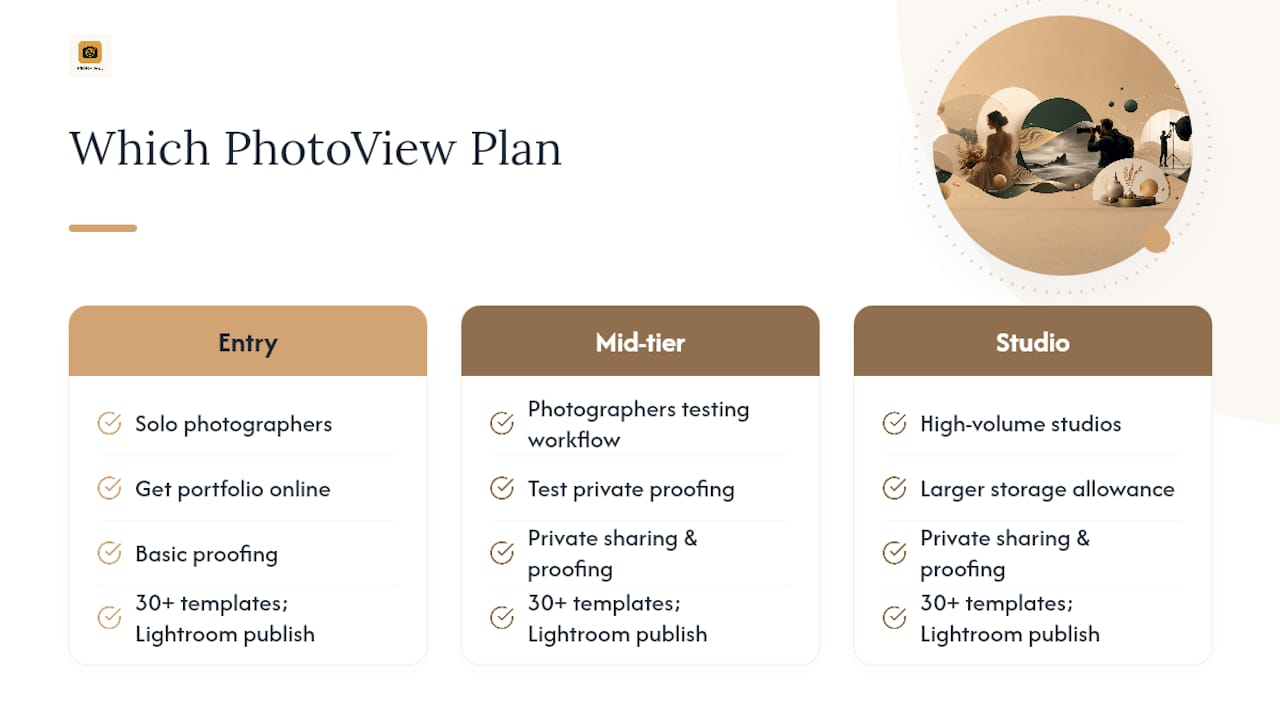
If client delivery is your main pain point, consider starting with a mid-tier plan to test the private sharing and proofing workflow on a real shoot. Solo photographers just getting their portfolio online can choose an entry-level plan, while high-volume studios juggling multiple shooters may require plans with larger storage allowances. For current pricing and plan details, visit the PhotoView website. Head to Photoview to start a trial, or import a gallery straight from Lightroom to see how the workflow feels with your own images before you decide.
Sources
For readers who want more technical depth on any of the categories above, a few sources are worth bookmarking. Zapier’s roundup of WordPress alternatives breaks down design-first versus workflow-first tools in more detail. Tooltester’s comparison for 2026 groups platforms by category rather than by brand, which mirrors the framework used here. For editorial and membership-driven photographers, Ghost’s own comparison against WordPress is a useful read before you decide publishing tools matter more than galleries.
- 9 best WordPress alternatives (Zapier)
- Image optimization technical guidance (MTU Webmaster blog)
- Ghost vs WordPress (Ghost)
FAQ
What Is the Best Platform for Photographers?
There’s no single best platform for every photographer, because the right choice depends on whether your priority is client delivery, visual design, or sales. For photographers whose main need is client galleries, proofing, and fast image delivery without plugin maintenance, a photography-first platform like PhotoView is usually the strongest fit.
What Is the Best Alternative to WordPress?
The best alternative depends on your primary pain point: template-led builders solve design problems, photography-first platforms solve client workflow and proofing problems, and hosted publishing platforms like Ghost solve editorial and membership needs. Match the category to the problem before comparing individual tools.
How Many Photographers Are Making Over $300,000 a Year?
Published industry data on photographer income at that specific threshold isn’t consistently tracked or publicly available. What’s clear from workflow research is that photographers who reduce time spent on site maintenance and plugin management have more hours available for paid shoots and client work, which is the more useful lever for most photographers to focus on.
What Is the 20-60-20 Rule in Photography?
There isn’t a standardized industry framework with fixed percentages for shot allocation recognized in current photography workflow guidance. If you’ve seen similar rules referenced, treat them as informal advice rather than established standards.
How Long Does It Take to Switch From WordPress to a Photography Platform?
A portfolio-only migration, moving galleries and key pages without a full rebuild, typically takes a few hours to a weekend. A full site rebuild with blog content and SEO redirects takes longer, often several weeks depending on how much existing content you’re carrying over.