
PhotoView Beats Zenfolio for Photographers Who Publish From Lightroom
Compare Zenfolio alternatives. PhotoView fits photographers: Lightroom publishing, private sharing, and live embeds. Try two platforms together before you...

PhotoView Beats Zenfolio for Photographers Who Publish From Lightroom
PhotoView is the strongest overall replacement for photographers leaving Zenfolio, especially if you want Lightroom publishing and live embeds baked into your workflow. For gallery-first client delivery, look at Pixieset. For print-heavy volume shops, SmugMug’s unlimited storage plans make sense. For design-first marketing sites, Squarespace fits better than any gallery-only tool. Try two platforms side by side before you commit to a migration.
TL;DR:
- PhotoView offers direct Lightroom publishing and private client sharing, eliminating the export-upload cycle common in Zenfolio.
- Pixieset excels in gallery proofing and delivery for wedding and portrait clients, making it ideal for gallery-focused businesses.
- SmugMug provides unlimited storage and print lab integrations, suited for high-volume, print-heavy photographers.
- Platforms like Squarespace and PhotoShelter focus on marketing and licensing, respectively, catering to design-forward sites or asset management needs.
- Choosing a replacement depends on identifying the primary pain point, such as workflow automation, storage capacity, or proofing depth, and testing platforms during trial periods accordingly.
PhotoViewPublish From Lightroom More EasilyPhotoView helps photographers store, curate, and publish finished photos through responsive portfolios, private sharing, and live website embeds.Explore PhotoView
Table of Contents
- What Are the Best Zenfolio Alternatives Right Now?
- How Do These Platforms Compare on Price, Storage, and Features?
- How Do You Choose the Right Replacement Platform?
- What Should You Expect From PhotoView Specifically?
- Which Platform Fits Your Type of Photography Business?
- Why Do Photographers Actually Leave Zenfolio?
- What Does Switching From Zenfolio Actually Involve?
- What Most Comparison Articles Get Wrong About Switching
- See What PhotoView Handles Differently
- Sources
- FAQ
What Are the Best Zenfolio Alternatives Right Now?
Photographers researching sites like Zenfolio usually land in the same spot: a dozen tabs open, a dozen pricing pages that don’t quite line up, and no clear sense of which platform actually solves their specific problem. The shortlist below narrows that down. Each entrant here shows up consistently across SaaSHub’s Zenfolio alternatives listing and Owler’s competitor tracking, which makes them the platforms worth your actual evaluation time rather than a passing glance.
PhotoView is built specifically for photographers who think of their site as a portfolio first and a sales tool second. You get secure storage for finished photos and video, more than 30 responsive templates, direct Lightroom publishing, private client sharing, and live embeds you can drop into an existing website without rebuilding it. If your Zenfolio frustration centers on clunky publishing (exporting from Lightroom, then re-uploading, then fixing formatting) PhotoView’s direct publish path removes that entire step. It’s the best fit if your priority is a polished, portfolio-first presentation with client delivery layered on top, not a storefront layered under a generic template.
Pixpa combines a portfolio builder with a genuine store, and some of its plans advertise zero-commission sales depending on the tier you choose. Photographers who want one platform to handle both the “look at my work” side and the “buy my prints” side without stitching together two tools tend to gravitate here.
Pixieset leans hard into gallery delivery and proofing. If your business is mostly weddings or portraits and your clients need a clean way to browse, favorite, and order prints, Pixieset’s interface is built around exactly that motion. It’s less of a marketing website and more of a delivery mechanism, which is either exactly what you want or a limitation, depending on how you sell.
SmugMug has built its reputation on storage. Its unlimited-storage plans and established print lab partnerships make it a natural landing spot for photographers who shoot high volume and don’t want to think about archive limits ever again. The tradeoff shows up in template flexibility. SmugMug photo sites tend to look more utilitarian than design-forward.
ShootProof pairs client galleries with business infrastructure. Contracts, invoices, and commission-free sales options sit inside the same dashboard as your proofing tools. Photographers who currently run separate software for contracts and separate software for galleries often consolidate here.
Squarespace wins on pure design. If your business depends on a marketing-forward site that ranks well and reads like a brand rather than a gallery dump, Squarespace’s templates outperform most gallery-first tools. It’s not built around photography specifically, so proofing and print fulfillment require more setup or third-party integration than a dedicated photo platform.
PhotoShelter targets professional asset management. Editorial, commercial, and stock photographers who need licensing workflows, keyword search across huge archives, and client-specific access controls will find more depth here than in consumer-facing gallery tools.
Format keeps things curated. Its templates favor a minimal, portfolio-first aesthetic, which suits photographers whose main goal is a clean showcase rather than a high-volume sales funnel.
Pic-Time builds premium storefronts with marketing automation layered in, including things like automated email reminders and slideshow-style gallery reveals. It suits photographers who treat gallery delivery as part of their brand experience, not just a file drop.
Wix offers the widest flexibility of anything on this list because of its app marketplace and drag-and-drop editor. That flexibility comes at a cost: photography-specific features like proofing and print fulfillment usually require third-party apps rather than native tools.
WordPress is the self-hosted option for photographers who want total control, custom plugins, and no platform lock-in. It demands more technical involvement than any other entrant here. You are responsible for hosting, security, and updates, which is either appealing or a dealbreaker depending on your comfort with the backend.
ClickSites shows up in some comparative roundups as a broad, general-purpose alternative, though it’s positioned less around photography-specific workflows and more as an all-around site builder in those listings.
A few tools round out the ecosystem without being direct site replacements. Divi functions as a WordPress theme and page builder rather than a standalone platform. Systeme.io and HoneyBook cover business operations like funnels, invoicing, and client management. Booqable handles equipment rental tracking. None of these replace a portfolio site on their own, but photographers migrating off Zenfolio often pair one of them with a gallery platform to cover gaps the core tool doesn’t.
How Do These Platforms Compare on Price, Storage, and Features?
The table below reflects vendor-published claims and product-page comparisons cross-checked against Capterra’s product listings, since exact pricing shifts and should always be confirmed on the vendor’s current pricing page before you commit.
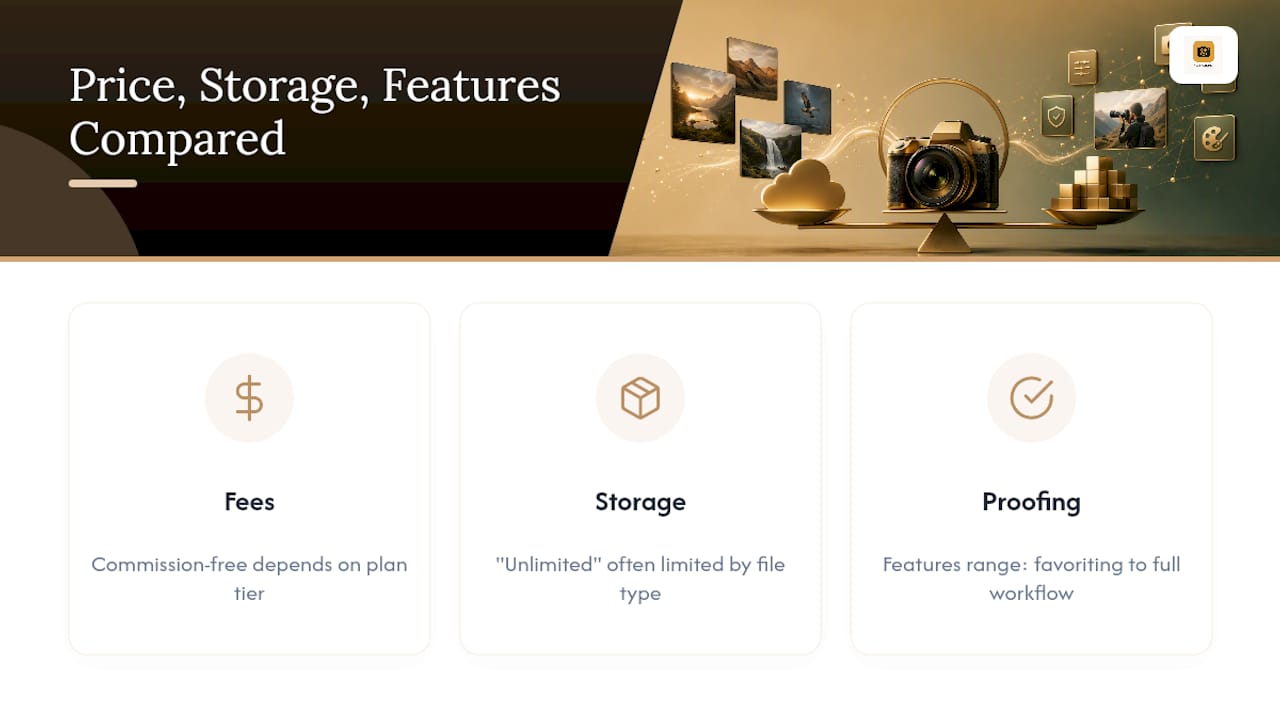
Three tradeoffs surface again and again once you look past the feature checklists.
Fees versus control. Commission-free sales sound appealing until you read the fine print on which plan tier actually includes it.
Unlimited storage has limits, functionally. “Unlimited” storage claims typically apply to photo hosting under specific file-type and usage terms. Video-heavy portfolios or RAW-file archiving sometimes hit different rules than the headline claim suggests, so read the fine print if your archive leans heavy on video.
Proofing depth varies more than it looks on a feature list. A checkbox that says “client proofing” on a comparison page can mean anything from a basic favoriting tool to a full approval, revision, and print-ordering workflow. Vendor comparison pages often overstate these differences, so the only reliable way to judge proofing depth is to run a real client through a mock order during a trial.
A quick note on methodology: the entrants above were selected because they appear consistently across independent competitor listings, not because any single vendor paid for placement. SaaSHub’s alternatives page and Owler’s competitor data both surface Pixieset, SmugMug, ShootProof, and PhotoShelter as recurring names, and feature claims were checked against each vendor’s own Capterra product page where one exists. Where a claim came only from a vendor’s own comparison page rather than a neutral source, it’s flagged as vendor-origin above rather than treated as verified fact.
How Do You Choose the Right Replacement Platform?
Picking a platform starts with naming your actual bottleneck, not scanning a feature list top to bottom. Ask yourself which of these matters most: storage ceiling, pricing shape, commerce and print fulfillment, client-facing proofing experience, template control, Lightroom integration, or built-in SEO and marketing tools. Most photographers can answer that in one sentence once they stop comparing every feature and focus on the one that actually caused them to start looking for Zenfolio competitors in the first place.
Once you’ve narrowed to two or three platforms, run this checklist during the free trial period rather than relying on the sales page:
- Upload a batch of at least 50 full-resolution images and time how long it takes.
- Test a bulk export to confirm you can pull your files back out easily, not just push them in.
- Walk through the client ordering flow yourself, from gallery link to checkout, as if you were the client.
- Confirm actual print lab integration by placing a test order rather than trusting the feature description.
- Set up a custom domain and verify it propagates cleanly without breaking existing links.
- Create a guest or client login and test what they can and cannot see or download.
Pro Tip: Set up a staging gallery with a friend or past client acting as the “customer” before you migrate anything real. Watch where they hesitate during checkout or download. That five-minute test surfaces UX problems no feature comparison page will ever show you.
Migration itself hinges on three things: export format, metadata preservation, and volume. Export your full-resolution originals, not just web-sized previews, and check whether your current platform preserves IPTC and EXIF metadata (keywords, copyright, capture date) on export, since some platforms strip it silently. If you’re moving a substantial archive, migrate in batches by year or shoot type rather than attempting a single bulk transfer, and confirm your new platform’s storage tier can absorb the full volume before you start deleting anything from the old one.
What Should You Expect From PhotoView Specifically?
PhotoView maps directly onto the pain points that send photographers looking for alternatives in the first place.
- Secure storage and organization keep finished photos and video centralized instead of scattered across drives and old exports, addressing the archive-anxiety that drives a lot of platform switching.
- A variety of responsive templates give you gallery-grid and cinematic layout options without touching code, so a portfolio-first photographer isn’t stuck with one generic theme.
- Publishing tools integrated with Lightroom removes the export-then-upload cycle that eats time on every single shoot delivery.
- Private sharing and multiple galleries for client-specific delivery let you send client-specific links without building a separate password system for every job.
- Live embeds keep a gallery on your existing website updated automatically from one dashboard, so you’re not maintaining two separate sites.
If your business model depends heavily on print lab fulfillment at scale or a fully custom commerce checkout, another platform on this list built specifically around retail sales may fit that narrow need better. PhotoView’s strength sits squarely in presentation and workflow, not in being the deepest print-commerce engine on the market.
Which Platform Fits Your Type of Photography Business?
If you’re portfolio-first and want your best work presented beautifully with minimal upload friction, PhotoView is the strongest match, particularly if you already shoot in Lightroom. Wedding and portrait photographers running client galleries at volume should weigh Pixieset or ShootProof for their proofing depth. Print-heavy shops moving serious volume belong on SmugMug for the storage ceiling. Agencies and commercial teams need PhotoShelter’s asset management and licensing controls more than any gallery-first tool offers.
Whichever direction you lean, trial two platforms side by side for two weeks rather than committing to one on the strength of a homepage. Run the same batch of images through both, test the client experience on both, and only then export your full archive with metadata intact. PhotoView’s trial is the fastest way to see if the Lightroom publishing workflow actually saves you the time it promises.
Why Do Photographers Actually Leave Zenfolio?
The trigger is rarely one dramatic failure. It’s usually an accumulation of smaller frustrations that finally cross a threshold. Photographers who migrate off Zenfolio commonly cite policy or archive changes and slow customer support as the tipping point, not a single catastrophic bug.
Underneath that, the recurring complaints tend to cluster around three things: template rigidity that makes every Zenfolio site look recognizably like a Zenfolio site, a publishing workflow that feels dated compared to newer Lightroom-integrated tools, and pricing that climbs faster than expected once storage needs grow. None of these are dealbreakers in isolation. Together, they’re enough to send a working photographer searching for photography portfolio alternatives that feel less like maintenance and more like presentation.
The other common friction point is export anxiety. Photographers sitting on years of client work worry, reasonably, about what happens to that archive if they want to leave later. That worry alone keeps some photographers on a platform they’ve otherwise outgrown, which is exactly why migration planning matters more than most comparison articles admit.
What Does Switching From Zenfolio Actually Involve?
Migration is a project, not a weekend task, but it’s a manageable one if you sequence it correctly. Expect the full process, from decision to live launch, to take several weeks depending on archive size and how much client-facing continuity you need to preserve.
Start with export, not signup. Pull your full-resolution files and confirm metadata survives the export before you touch a new platform. Run a small test batch, ideally one full gallery, through your shortlisted alternative to confirm upload speed, template rendering, and client link behavior all work the way you expect. Only after that test succeeds should you commit to migrating your full archive.

Plan your domain transition separately from your content transition. If you’re keeping the same custom domain, you can often point it at the new platform once your galleries are live, minimizing the window where old client links break. Notify active clients with pending galleries before you flip the switch, since mid-project link changes are the single most common source of client confusion during a platform move.
Budget the final week for cleanup: broken links, redirect checks, and confirming every archived gallery you care about actually rendered correctly on the new platform before you cancel your old subscription.
What Most Comparison Articles Get Wrong About Switching
Most Zenfolio alternative roundups treat this as a feature checklist problem: count the boxes, pick the platform with the most checks. That’s backward. The photographers who end up frustrated again eighteen months after switching are usually the ones who picked based on a comparison table instead of their actual daily workflow.
The real question isn’t “which platform has more features,” it’s “which platform removes the step that currently wastes your time.” If that step is exporting from Lightroom and reformatting for upload, no amount of storage or template variety fixes that; you need direct publishing. If that step is client confusion over private links, you need a private-sharing workflow, not a bigger app marketplace.
Conventional advice also underweights export anxiety. Comparison articles rarely mention metadata preservation or batch export testing, yet that’s the detail that turns a smooth migration into a nightmare. Test your export before you fall in love with a new interface.
Prioritize the workflow fix first, the storage ceiling second, and the design polish last. Photographers get that order backward constantly, chasing the prettiest template while ignoring the publishing bottleneck that made them start looking in the first place.
— Mitch Russo
See What PhotoView Handles Differently
PhotoView removes the export-and-reupload cycle that eats hours out of every delivery week, publishing directly from Lightroom instead of forcing you through a separate upload step every time.

Here’s what sets it apart for photographers actually making the switch:
- Publishing tools integrated with Lightroom, so finished edits go live without a manual re-upload
- Private sharing and multiple galleries for client-specific delivery without building a password system from scratch
- A variety of responsive templates covering everything from minimal grids to cinematic full-bleed layouts
- Live embeds that keep an existing website’s gallery updated automatically
- Mobile-ready presentations that hold up on various devices
During a trial, expect to test upload speed with your own archive, preview how your existing images render across different templates, and set up a private gallery to see the client-side experience firsthand. PhotoView’s storage-based plans scale to custom volume tiers for different archive sizes. Start a trial on PhotoView’s solutions page and run your first real gallery through it before you decide anything.
Sources
For readers who want to verify claims independently, SaaSHub’s Zenfolio alternatives page tracks commonly named competitors and their headline features. Owler’s competitor listing offers a market-positioning view of PhotoShelter, SmugMug, and other rivals. Capterra’s product pages hold verified user reviews useful for checking whether a vendor’s marketing claims match real-world experience. When reading reviews versus vendor specs, weigh recent reviews more heavily than lifetime averages, since platforms update features and pricing often enough that a three-year-old five-star review may not reflect the current product.
- Zenfolio Alternatives & Competitors - SaaSHub
- Zenfolio Competitors and Alternatives - Owler
- Capterra - software product pages and reviews
FAQ
Is ShootProof Better Than Zenfolio?
ShootProof edges ahead for photographers who want proofing and business tools like contracts and invoicing in one dashboard; Zenfolio remains a reasonable generalist, but ShootProof’s integrated commission-free sales options give it an advantage for client-facing sales workflows specifically.
Is Pixieset Better Than Zenfolio?
Pixieset’s gallery and proofing experience is generally considered more polished for client delivery, particularly for weddings and portraits, while Zenfolio spreads its focus more broadly across portfolio and e-commerce features.
Is Zenfolio Worth the Cost?
Zenfolio still works for photographers who haven’t hit its pain points, but the recurring complaints about template rigidity, dated publishing workflows, and rising storage costs are pushing a growing number of users toward Zenfolio alternatives like PhotoView, SmugMug, and Pixieset.
Is SmugMug Better Than Zenfolio?
SmugMug generally wins on raw storage capacity and print lab partnerships, making it the stronger pick for high-volume print sellers, though it trades some template flexibility to get there.
What Should I Look for in a Zenfolio Competitor?
Match the platform to your actual bottleneck first: Lightroom publishing and template flexibility if you’re portfolio-first, proofing depth if you sell heavily to clients, and storage ceiling if you’re archiving large volumes, rather than picking based on feature count alone.